
A4Tech Ultracore3 V7 Gun3 Gaming Mouse
A4Tech UltraCore3 V7 Gaming Mouse Review
Manufacturer: A4Tech, a division of Azend Group
Product Name: USB Wired UltraCore3 V7 3200 DPI Bloody Gaming Mouse
Model Number: V7
UPC: 4711421895774
Price As Tested: $39.99 (Newegg / Amazon)
Full Disclosure: The product sample used in this article has been provided by A4Tech.
Being an enthusiast doesn't necessarily mean pouring an incredible amount of money into a hobby. While going to a web site that sells computer components, sorting by "Highest Price" and just adding everything at the top of the list to your cart will probably result in a fast computer (probably...) I'm not sure if that is what defines an "enthusiast." Sometimes finding those products that ride that price/performance line, getting the absolute most for the money spent - that's where enthusiasm can be found. A4Tech, a company with 25 years of experience with mice and other peripherals, has just released a new line of gaming mice that Benchmark Reviews is going to take a look at today. First up, the A4Tech Ultracore3 V7 wired gaming mouse - let's see what A4Tech has in store for gaming enthusiasts...
A4Tech's new line of gaming mice had caught my eye on Newegg earlier, and seemed intriguing given the price at which they were listed. $40 for a gaming mouse? Surely, in a world of $80+ gaming peripherals, all with a promise of game-changing features to make you the most skilled player on the server, the V7 couldn't possibly compete right? I'm always on the lookout for a great mouse for a great price, so I couldn't pass up the chance to give one a try. I was curious to see what A4Tech could bring to the table, other than the ever-increasing DPI race. Options are always good, and it seemed at first glance the A4Tech Ultracore3 V7 was a good option. Time to put that notion to the test!
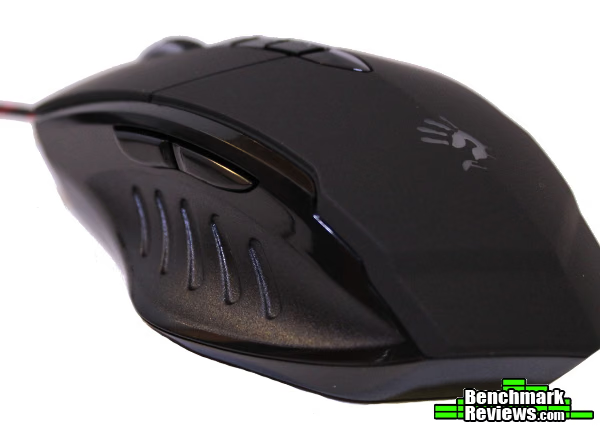
A4Tech V7 Specifications
Basic Parameters:
- Multi-core system
- Button No.: 7 keys + Wheel
- Direction of wheel: one way direction
- Tracking: HoleLESS HD engine
- Type: Wired
- Mouse connection: USB (2.0/3.0)
- Hardware system requirements: Windows /Mac OS/Android/Linux
- Software system requirements: Windows XP / Vista / Windows 7
- Mouse size: 125 x 64 x 39 (mm)
- Cable length: 1.8 m
- Mouse weight: 155 g
Technical Parameters:
- Resolution: 200 Dpi to 3,200Dpi (5 ranges adjustable)
- Image processing: 368 mega pixels / sec
- Acceleration: 30g
- Tracking speed: 75 inches / sec
- Report rate : 1,000 Hz(4 ranges adjustable)
- Key response time: 1ms
- 160K onboard memory
Specifications provided by A4Tech.
Closer Look: A4Tech V7
It's immediately apparent where some of the inspiration for the packaging for the A4Tech Ultracore3 V7 gaming mouse comes from. Change that red to a bright green, and...well, some of the “fruitier” companies would probably find some way to find an infringing copyright somewhere. The packaging conveys the message that this mouse is built for a specific purpose, and it protects the product simply and effectively. Other than some similarities to other brands, there are no surprises here.
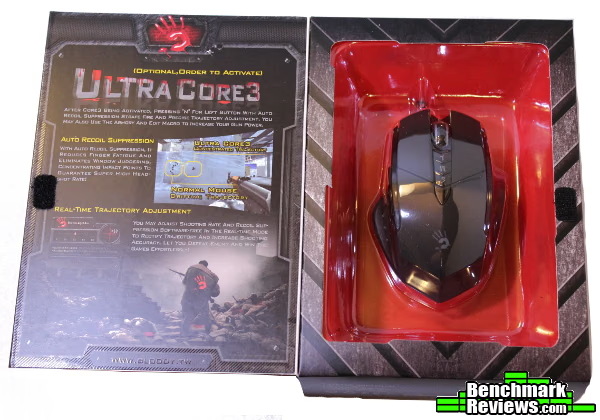
When you open the box, the game changes slightly. Extracting the mouse is simple, but the avalanche of included extras was quite a pleasant surprise. Along with a mini driver disc, the A4Tech V7 comes with a lint-free cloth to wipe off that Holeless Engine (more on this later), a quick start manual, and a package that contains 3 (!!!) extra sets of mouse feet. Three sets!!! They seem to be the same PTFE / Teflon material as other gaming mouse feet, and aren't paper thin either. While everyone has a different definition of “avalanche of extras,” the package of accessories included with the V7 were far beyond what I am accustomed to in this price range.
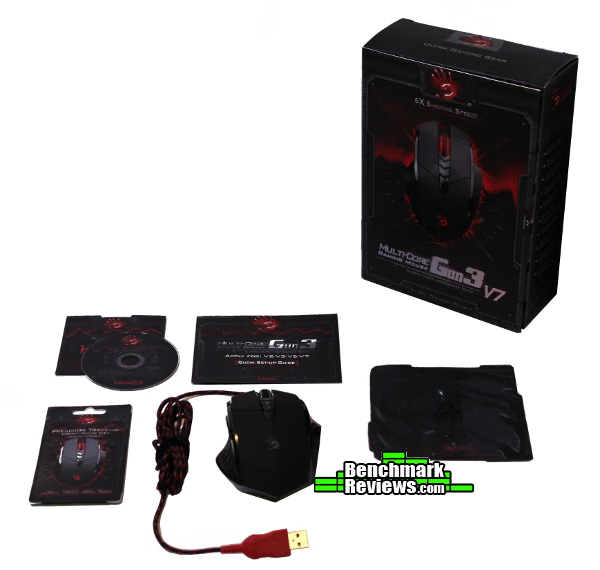
Taking a closer look, the value just gets better and better. I've had zero experience with any A4Tech products previously, but I have had experience with “cheap” gaming mice. With a price point of $40, I was not expecting the same premium feel as other, more expensive mice. I was pleasantly surprised (again) to find this was not the case. Without rendering the rest of the article (and summary) irrelevant...this mouse just feels good. It is sturdy, the surfaces feel good on your fingertips, it has a decent weight, isn't awkward to hold, the primary mouse buttons are wonderfully clicky - so far it is checking all of the right boxes.

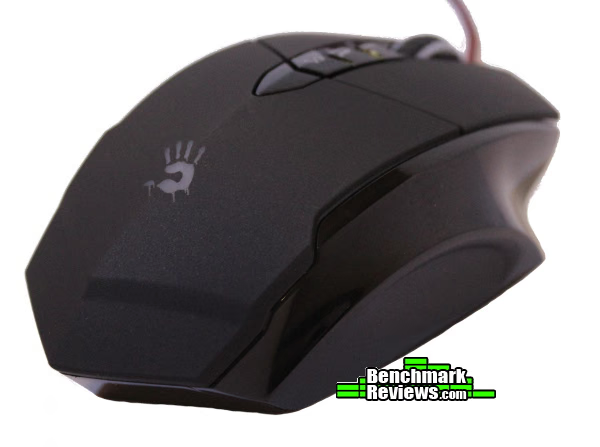
Small touches such as the “chevron” angles on the main body of the mouse matching the primary mouse button(s) seam, as well as the dpi/Core switching buttons on top of the mouse...to the bi-color braided cord (with included velcro cord wrap) and colored USB connector show that there were some consistent decisions made while designing this mouse. None of these should affect performance, but those “attention-to-detail” touches tell me there was some thought behind the design rather than just slapping a plastic shell on a sensor and calling it a day. This is a sharp looking peripheral, and based solely on appearance I'd say A4Tech wants to earn your business. The “Bloody” hand logo and red LED lights may not appeal to the professional crowd, but if you pick this mouse after seeing the packaging and still think it's a mouse you can use at work that would be your fault.

On the surface it looks great, let's take a look and see how the V7 performs.
A4Tech V7 Detailed Features
HoleLESS HD Engine
One of the first things you may notice when turning over the V7 is the lack of a sensor hole anywhere - not to worry, as A4Tech has made sure to describe on the bottom of the mouse itself it is just a feature of the HoleLESS engine. As far as I can tell, it is simply a tinted window for the sensor. Simple, but incredibly innovative. After the issues my Razer Lachesis (with the 4000 DPI) sensor had with any speck of dust or thread getting in the sensor hole, this simple change seems long overdue. Perhaps it only works with optical sensors - in any case, it is one of those features that makes you wonder why no one has done it before.

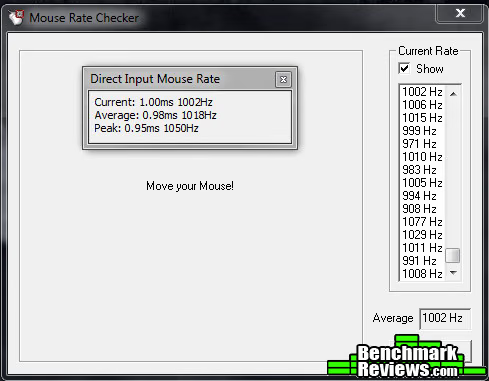
It may or may not be a result of the HoleLESS engine, but the sensor performed flawlessly throughout my testing. I was surprised to find it functioned perfectly on the glass top of my desk, as well a Goliathus Speed Edition pad and Destructor hard pad. You shouldn't experience any trouble finding a surface on which to use the V7. It reminded me of the flawless performance I experienced from a Razer Death Adder when they were first released. The polling rate was similarily solid - testing using a direct input mouse rate tool, along with a mouse rate checker utility showed the 1000 Hz polling rate to be as claimed.
6x Shooting Speed
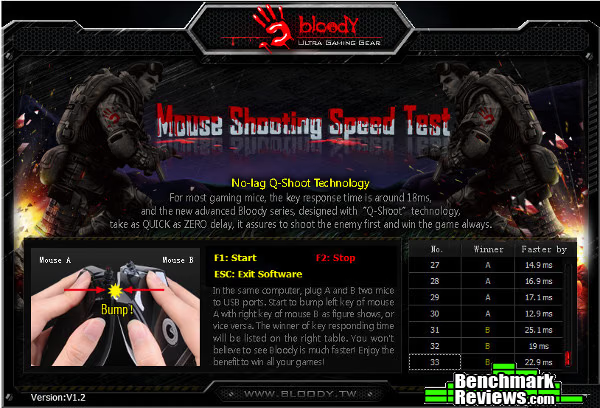
On the packaging, the V7's marketing team wants to ensure you don't miss out on any features - one of which is the claimed 6x faster shooting speed. As gamers, we'll take every millisecond we can get - and if the claims are true (most mouse buttons activate after ~18 ms, whereas the V7 will register a press after only 3 ms) that ~15 ms difference might determine if your input gets placed in the current outgoing frame of action or the next. While testing that specific circumstance is outside the scope of this review, A4Tech provides a mouse click speed test that you can use on whatever set of mice you would like. It just so happens I have a group of Razer mice standing by to test against.
You can see in the screenshots I followed the testing procedure described in the software program - you simply activate the program, then press the left mouse button of mouse “A” against the right mouse button of mouse “B”. To the right, you'll see the results. I tested each mouse three times, then switched “sides.” Finally, I tested two Razer mice against each other - it seems the results were pretty consistent and back up the claims made on the V7 packaging.
Up first, the V7 (starting as Mouse A) vs. the Razer Orochi mobile gaming mouse (tested in wired mode):

The V7 vs. Razer Lachesis:

Finally, the Razer Imperator vs. Razer Lachesis:

It sure looks as if the V7 has the hardware to back up the marketing claims. It would be an interesting debate to decide how much these results actually matter in a gaming situation, but it confirms the button response on the A4Tech V7 is about six times faster than other “gaming” mice - according to A4Tech's speed test tool. Whether this is a function of the type of switches or some other hardware choice I'm not certain - but there it is. More importantly, can you feel the effects in-game? It certainly doesn't detract from the experience, and the buttons on the V7 do feel more responsive. I would say it is more important you find a mouse that fits your hand and become as familiar as possible with your chosen peripheral, but it is nice to know the V7 gives you every opportunity to get the jump on your opponents.
A4Tech V7 Test Results
It is difficult to make it to this point without mentioning the “Ultra Core3” feature of the V7. While it technically isn't included in the price of the mouse (although it can be used for a short trial period), it is heavily marketed across the entire Bloody line of mice. Each Core has slightly different functions. Core1 is a typical setup, allowing you to program each button to multiple functions (keyboard keys, media functions, increase/decrease mouse dpi), as you would expect of any other gaming mouse. The CPI settings seem to remain as you have last set them in each Core mode, which makes the initial setup a little more complicated - but conversely make returning to each mode much simpler, allowing you to return to “the way you left it.” The functions here perform as expected - after installing the driver, it is simple to open the Bloody configuration software and adjust as you see fit. I found myself spending most of my time using this mode, as it performs all of the standard gaming functions and required the least amount of tweaking. The only issue I noticed here was the on-screen CPI display would cause Battlefield 3 to pop out of fullscreen mode and into windowed mode. Simply clearing the checkbox for the onscreen display avoided the issue, but hopefully it is something that will be fixed in the future.
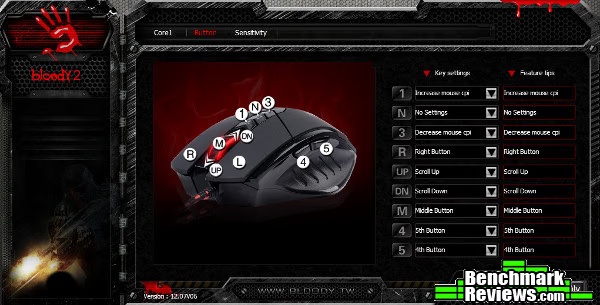
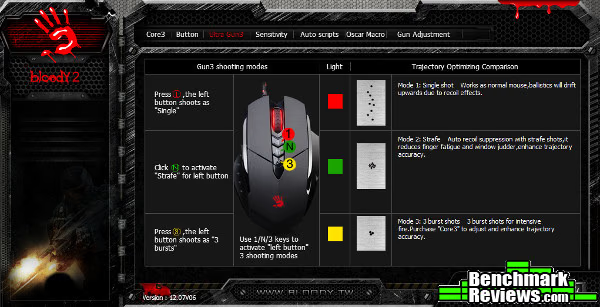
If you don't want to purchase the Core3 package, you can still use some extra features with the Core2 mode. In this mode, the three buttons located beneath the scroll wheel serve to switch between different burst modes - pressing the top button (labeled with a “1”) switches to normal operation, while pressing the middle (“N”) button switches to a two-shot burst mode (and changes the scroll wheel LED to green). Naturally, the “3” button will switch to a three-shot burst (with a yellow scroll wheel LED to signify the mode). These functions work as described, but not possibly as you would expect. They seem to activate a macro, causing either a single, double, or triple left mouse click - which would be beneficial, except the activated macro cannot be interrupted. Testing this feature in Battlefield 3, it became obvious that merely controlling your mouse clicks was more effective for the fast play style of multiplayer - if you were to round a corner still in 3-shot burst mode, it was impossible to provide the volume of fire you would need at close range without switching to a different mode. Given enough time and a game that didn't already provide different firing modes, Core2 might become more useful - as for me, I found playing without any burst features was much more effective.
Really, if you wanted an advantage, you'd be much more interested in the Core3 features anyway. Here's where it gets interesting (“morally” as well...but that would be better suited for a discussion or an editorial...). You can trial the Core3 features, up to 1,000 clicks from what I understand - and given my experience playing around with it, you may want to take advantage of this trial just to see what it is capable of. I'd be very interested to hear others' opinions of “recoil suppression” and “trajectory adjustment” features in a gaming mouse and their use in a multiplayer game, but for the purposes of testing these claims I jumped onto the first empty BF3 server I could find and set to work dialing in the adjustment tool.
You may need to spend some time reading through the directions, as it isn't immediately clear how the trajectory adjustment and recoil suppression work. It's actually a pretty slick system though, and works as described - just read the directions! As you can see in the screenshots, I attempted to adjust the trajectory and suppress the recoil of the G3A3 rifle in Battlefield 3 - and it took a couple tries to get it dialed in (read the directions! I spent a couple minutes adjusting the recoil in the wrong direction...). I almost gave up, writing it off as a gimmick - then you can see the groups tighten as I figured out what each adjustment does. The groups in the screenshot below were shot in fully automatic mode from right to left, from an in-game distance of ~50 meters.

It will vary per weapon, but when you get it dialed in... Notice the final groups, fired fully automatic - each in the same space as the first shot. The software makes this pretty simple to do in-game, with intuitive controls and an easy way to enter/exit the editing mode (double click "N" button to start, click the “N” button to save). Scary stuff, depending on who you ask... It was great to see it work as described though, and this is one of the most “game-changing” features I've seen added to a gaming mouse. With anything, your mileage may vary - after my success with the G3A3, I attempted to adjust the profile for the M60E4 machine gun (can you imagine? 200 rounds of precision placed bullets?), with some success.

Obviously, the software works better for weapons with less “random” recoil, but it did manage to tighten the groups enough (from left to right) to warrant some more attention. For what it's worth, there is a three-shot burst mode in the Core3 profile as well that can be adjusted as well. It is my personal opinion that your skill would increase much more if you spent the time learning the different recoil patterns of each weapon rather than tweaking software to do it for you, but perhaps I'm old fashioned... In any case, the option is there for those that are interested, and it does work - quite well.
A4Tech V7 Final Thoughts
If products were evaluated purely on where they sit on the price/performance curve, this mouse should be at the top of your list. It is well made, functions perfectly mechanically, has a great feel, great ergonomics, attractive, and "just feels good." It even includes some innovations that I haven't seen on other mice, and make quite a bit of sense.
The Holeless Engine really solves the problem that mice with high-precision laser sensors struggle with (should I track the surface or the dust/hair/fibers that get stuck in the sensor "hole"?), and it does so in a simple and effective way. The sensor has performed admirably (it worked just fine on the transparent glass surface of my desk!) and didn't skip a beat throughout.
To say I was pleasantly surprised testing this product would be accurate - I've been accustomed to spending at least twice as much as this product to get something that "feels right." I love the tactile feedback of the main mouse buttons, and while some of the surfaces could use less glossy black and more matte finishes for grip overall this is a solid product that should offers quite a bit over the competition at its price point.
A4Tech V7 Conclusion
You really have to keep in mind while using this mouse the price category it is in. If you do that, you are going to begin wondering why you would need to spend more. As of late December 2012, the A4Tech USB Wired Ultracore3 V7 3200 DPI Bloody Gaming Mouse sold for $39.99 (Newegg / Amazon).
The attention to detail really impressed me, especially (once again) given the price point of this product. Mice are incredibly subjective in the first place, and trying to rate appearance is like...trying to do something that's really hard. I think the A4Tech V7 is an eye-catcher, and happen to like the design. Others may not, but they already know what they like (hopefully), so don't get too wrapped up over a number.
Construction is less subjective - you can feel the difference between something thin and rattly or solid and well-built. The V7 is well-built, with nary a weird seam or creaky wheel. This mouse feels great in hand with a solid, substantial quality that is impressive given its all plastic construction. Each button actuates as you would expect, and the primary mouse buttons and scroll wheel all have a great tactile feel and response. So often your primary mouse button becomes a trigger to a weapon - all the better if that trigger has a finely tuned feel.
The V7 has all the functionality one could expect from a gaming mouse, and then some. The additions of the multiple “Cores” and their respective settings add functionality that you wouldn't expect from a gaming mouse. This is a mouse that isn't shy about its purpose, and unless you need more buttons you'll get more functionality here than in the majority of products out there.
The value is astronomical. It would be a fair option if it were just a well-built, solid performer with some lights. Add in the software, programmable buttons, optional upgrades for additional functionality, included accessories and overall build quality, and the price is incredibly competitive and reflects a value that is more than enough to forgive the relatively few faults. I would not hesitate to recommend this product to anyone that was looking for a great gaming peripheral. If this mouse is any indication of the rest of A4Tech's lineup, I'm excited to see what else is in store.
 Pros:
Pros:
+ Unbelievable value
+ Three sets of replacement mouse feet!
+ Great construction
+ Grippy sides
+ Comfortable shape (and a place for your ring finger)
+ Innovative features
+ Tracks well on many surfaces
+ Includes all of the expected “gaming” features - and then some
Cons:
- Some English translations could use a little tweaking, not really a con if it doesn't bother you...
- On-Screen CPI adjustment display causes strange behavior in some games
- “Hackusations” will fly...
- Glossy surfaces can become slippery
Ratings:
- Performance: 9.50
- Appearance: 9.50
- Construction: 9.50
- Functionality: 9.75
- Value: 9.75
Final Score: 9.6 out of 10.
Excellence Achievement: Benchmark Reviews Golden Tachometer Award.
Benchmark Reviews invites you to leave constructive feedback below, or ask questions in our Discussion Forum.
Reader comments from the original article
21 comments were posted before commenting closed. They are preserved as written. Original avatars no longer resolve and are shown as a placeholder.
Inquiry JP Permalink:
Hi, Benchmark reviews Is this an ambidextrous shaped mouse? (right/left)
RE: Inquiry Tom Jaskulka Permalink:
Although the "grippy" surfaces are on both sides, the design is meant for right-handed users. The area of the mouse for your ring finger is narrow enough that it wouldn't get in the way if you tried to use it left-handed, but there are other mice in this line that are truly ambidextrous - I'd recommend taking a look at those if that is what you're after.
Brilliant Review Muneeb Hanif Permalink:
Hi, I have been using this mouse for a about a week now. No regrets what so ever perfectly fits my hand and the accuracy on this thing is spot on. From what i have seen on MS Paint there is no prediction what so ever. Clicks are fast and although i think its too early to call but this mouse has to be the best in its price range. The whole Core 3 feature just went over my head. Benchmark reviews i would love to hear from you in this regard so when using the recoil suppression feature can you shoot all 30 rounds as you desire with the recoil adjustment provided or do rounds get fired in bursts. Thanks
RE: Brilliant Review Tom Jaskulka Permalink:
Regarding the Core 3 feature, you can select and adjust different recoil patterns for two firing modes - "normal" and 3-shot burst. The normal mode will fire fully automatic, as long as the weapon in game fires fully automatic. It would be equivalent to holding down the fire button. The 3-shot burst mode is separate from "normal," and acts as you would expect, firing 3 shots every time the fire button is clicked. I can understand your remark regarding the Core 3 feature, as I've never seen anything like it. I was surprised to see it worked, and quite well at that. Hopefully this helps answer your question!
Thanks Muneeb Hanif Permalink:
Thanks for the nice explanation i think that has cleared my head somewhat :P....will try using these features...its more trial and error to see what suits what gun best...One last thing by normal you mean the green light right or the red one
RE: Thanks Tom Jaskulka Permalink:
The red light (scroll wheel) depicts "normal" mode.
Software Emer Gencyexitonly Permalink:
Does it work without installing anything! (Use in diferent computers)
RE: Software Tom Jaskulka Permalink:
It will work just fine without installing anything, although like many other mice with profiles you won't be able to customize any of the button assignments. If you're fine with the defaults, you'll still be able to use them as such. You'll have to install the software driver to change any of the defaults obviously, but once you do those custom settings will be saved onto the mouse - allowing you to use it on many different machines with your custom settings without having to install the drivers again. Keep in mind you won't be able to change between the different Cores without the driver though. Hope this helps!
RE: A4Tech Ultracore3 V7 Gun3 Gaming Mouse s2korpio Permalink:
Mother of... What? This? Coming from a company that makes cheap to average peripherals?! Talk about the ultimate price-to-QUALITY ratio! I've been meaning to find a mouse with great attention given to its clicking feedback, and the one company that does this is the one that's been known as boring... I have to say this is a wonderful thing :) Shame on Logitech. Years of experience and they never seem to evolve beyond the concept of "more is better".
RE: RE: A4Tech Ultracore3 V7 Gun3 Gaming Mouse Jan Horak Permalink:
Hi, i would buy this mouse, but i have one question. Is need to buy Core3 or other program for this mouse to get all function of this mouse? thanks all
RE: RE: RE: A4Tech Ultracore3 V7 Gun3 Gaming Mouse msa502 Permalink:
He means the Ultra-Core3 software to activate the recoil suppresion. From of what I heard in this review, and take a look at the bloody's site, that Ultra-Core3 software has a trial mode for 1000 clicks, and then you'd have to buy the software to use it again ( listed here: bloody.tw/en/core3/core.asp?MachineCode= ). Imo, this review should add that Ultra-Core3 price to the mouse price as you can't really get the full function of the mouse if you won't buy the software (yes you get the trial mode, but 1000 clicks will be going in no time in fps games).
Brand Manager Demetri Newson-Thompson Permalink:
We have two separate models of the V7, we have the pro model and the basic model. The pro model does come with the Ultra-Core3 already activated, while the basic does not. We initially offered the software separately, but we understood the need to bundle them together. So we have.
RE: Brand Manager Olin Coles Permalink:
That fact that an A4Tech representative must comment on a review to explain your product speaks volumes. The lack of forethought in this product and it's many confusing names is astounding. Not only is the product name a complete mess because the website, packaging, and product are each branded with a different name, but your software lacks a real-world trial period. Be lucky that I wasn't the person to review this product, or it would have been rated much lower.
Could you post your settings for G3A3? Muneeb Hanif Permalink:
Hi, benchmark reviews can you please post the settings on the dial you used to counter recoil of the g3a3 rifle. I can't seem to counter recoil of more then 15 bullets(full-auto) after which the gun starts to aim downwards automatically and i am unable to control it. THANKS!!!
Great mouse! jarmart Permalink:
Great mouse, tracking is flawless, click are super responsive, the ring finger rest is nice but has kind of a abrupt edge to it that can be uncomfortable for long sessions. The modes (or core's as the call them) are nice. One major issue in mode 1 (core 1) you get 1,N, and 3 middle buttons as extra programmable buttons. But in that mode you can't use profiles that load by starting a program/game. So if you want to auto assign "z" to mouse4 when you start Skyrim, can't do it in mode 1. Load mode 2 (core2) you can but you have 3 less buttons since the middle buttons are pre-assigned to recoil suppression. Not a major issue if you play FPS but can be a in RPG. All in all one of the better mice I've used.
Brand Manager A4Tech Demetri Newson-Thompson Permalink:
We understood this issue also... So for that reason. We have developed specific MMO and RPG mice for our new Bloody Series. We will be unveiling them around M3. Our booth will have them on display.
braveone69 David Glasgow Permalink:
its a mouse well worth the money, its just an excellent mouse...(Period)
RE: A4Tech Ultracore3 V7 Gun3 Gaming Mouse Skidmarks Permalink:
For 40 bucks you really can't complain
Mac os Alex Permalink:
I would like to buy this mouse but I have a mac, do you know how it works on MAC OS? Thanks ;)
RE: Mac os David Ramsey Permalink:
As noted on the first page of the reviews, in the Specifications table, the mouse hardware will work fine on a Mac, but the supplied software is only for Windows. So you can connect the mouse to a Mac and get basic mouse functions, but not the enhanced features provided by the software and drivers.
that software Waleed Permalink:
im planning to buy this mouse but i'm not interested in that feature ( it will kill your gaming skills and is probably cheating/hacking, cheating is cheating if done by software or hardware ) anyways i wanted to ask if Using this mouse without that Recoil cancel stuff features, will it be good for FPS games then? im talking about grip and 3200 dpi is more then enough, the mouse looks awesome though, and if im not using that core feature, what buttons can get keyboard shortcuts?