
Corsair Obsidian 650D Computer Case
Corsair Obsidian 650D Computer Case Review
Manufacturer: Corsair
Product Name: Obsidian 650D
Model Number: CC650DW-1
Price As Tested:$199.99
Full Disclosure: The product sample used in this article has been provided by Corsair.
The Obsidian 650D is Corsairs second attempt at a mid-tower case and the third case in the Obsidian line that started with the 800D almost two years ago. The 650D was created in response to the two biggest complaints about the 800D, which were price and size. Priced at $199 and now in a mid-tower design both issues have been addressed. At the same time the 650D has retained many of the same great features and aesthetics that made the Obsidian 800D so popular. While evaluating the Obsidian 650D Benchmark Reviews will see if it is worth of the Obsidian moniker it has inherited or if many of the features its older brother had have been lost in the transition to a smaller size.
When Corsair introduced the Obsidian 800D in early 2009 it drew interest from reviewers and users alike. Its sleek look, well thought out interior, and many features made users envy for it. Sadly it was prohibitively large, and at $300 outside of the price range of many enthusiasts. Over a year later Corsair brought out the Graphite 600T. With its mid-tower size, wonderful features, and $150 price, the 600T was exactly what many users were looking for in a case. Sadly the 600T changed the breathtaking aesthetics that many users enjoyed from the 800D. Corsair brought out the Obsidian 650D to correct that by combining the size and interior of the 600T, with the external aesthetics of the 800D.

When reviewing a case you have four major things you need to look at. First, you need to look at build quality because no one wants to spend hours putting hardware in a case only to find defects or to have parts that will fail months later. Secondly, you need to look at cooling because as the heat output of components goes up, so do cooling needs. Third, you need to look at the acoustics of your new case because as anyone who has worked on or near servers knows adequate cooling can come at an acoustic cost unless a company put expenses into preventing this. Lastly, you need to look at the ease of build, which depending on your system may or may not play a big role in your choice of case. If you like, I spend lots of time inside of your case modifying parts then you want a system that you can easily move around in while making modifications. On the other hand if you want to setup your system and leave it then this becomes less of an importance and therefore can be moved lower on the requirements for your case.
Corsair 650D Features
- Dual 200mm fans provide outstanding cooling for even the hottest components
- Easily accessible dust filters make maintenance simple and hassle-free
- Quick-release side panels make it easier than ever to upgrade your hardware
- Integrated fan controller lets you quickly adjust cooling performance and noise levels
- Four tool-free optical drive bays and up to six SSD-ready hard drive trays provide plenty of expansion
- CPU backplate cutout makes it easy to upgrade your CPU cooler
- Brilliant cable routing system provides a way to keep your system neat and tidy
- Adjustable drive cages can be removed and relocated to accommodate large video cards
- Room for long power supplies gives you peace of mind for future upgrades
Corsair 650D Specifications
| Warranty | Two Years |
|---|---|
| Dimensions | 21.5" x 9"x 20.5" |
| Motherboard Support | ATX, mATX |
| Expansion Slots | 8 |
| Form Factor | Mid-Tower |
| Materials | Steel with brushed aluminum faceplate |
| Drive Bays |
4 x 5.25" |
| Cooling | 2 x 200mm 1 x 120mm fan |
| Front I/O |
4 x USB 2.0 |
| Power Supply | ATX |
Closer Look: Exterior
The exterior of a case is the first thing many people notice and the Obsidian 650D does not disappoint in that aspect. The sleek black exterior of the 650D helps it fit into a gamers den, or a nice home office.

The sleek black brushed aluminum exterior 650D is a simple elegant design. It is a nice departure from the flashy exteriors that have become popular for gamers in recent years. At the same time this mid-tower case leaves room for up to four external 5.25" drives and a full complement of connections from the front panel.
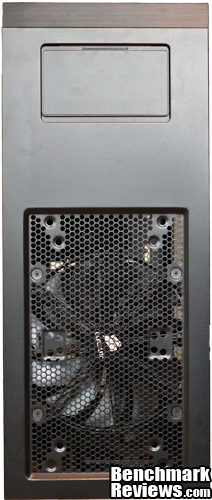
The top of the 650D shows one of the two 200mm fans used for cooling. The 200mm fan can be replaced with either 2 x 120mm or 2 x 140mm radiator or fan depending on what user would like to use for cooling. At the same time Corsair has also included an external docking mount for both 3.5" and 2.5" drives allowing users quick hot swap access to their data.

Both sides of the 650D utilize the locking mechanism that was introduced on the Graphite 600T. This allows for users to quickly remove the sides of the 650D to work on the components inside. One thing that should be considered with the Obsidian 650D is that although classified as a mid-tower case, in reality fits in between a traditional full-tower and mid-tower.

Continuing the excellence that has been seen so far on Obsidian 650D, Corsair has amazingly included eight expansion slots on the back of the case! This means in this mid-tower case users can easily run a quad-SLI/CrossFireX setup. This is an amazing feat, possible mostly because of the size of the 650D. None-the-less, some reviewers here wouldn't be caught using a case with less than eight expansions slots and so we may finally have a mid-tower case for them.

From the bottom you can see the removeable filter under the PSU that has been included on the 650D. Also apparent are the feet that Corsair uses keep users PSU's off the ground and supplied with fresh air.
Detailed Exterior Features
The Obsidian 650D has some tricks up its sleeve that help take care of users parts without being in the way or seeming like a last minute idea.

The front panel is behind a spring loaded cover and contains two USB 3.0 and 2.0 ports, an IEEE 1394 port, and front panel HD Audio ports. Also included is a slightly recessed reset switch. Even here the attention to detail is apparent, with the interior plastic matching exactly the color of the brushed aluminum.
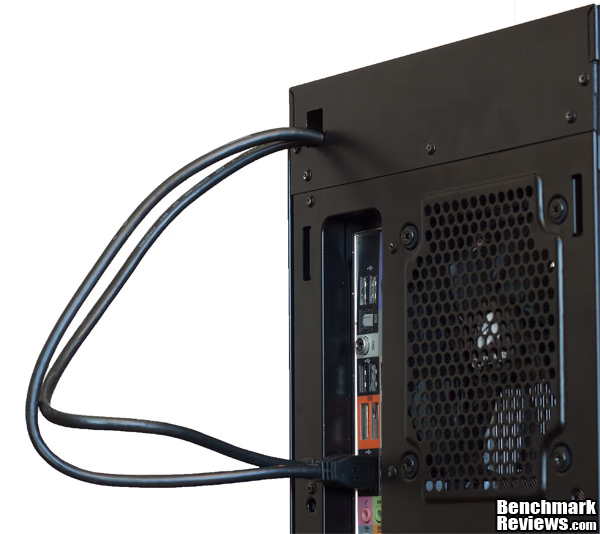
Sadly, one place where the Obsidian 650D falls on its face is the way in which the connections for the front panel USB 3.0 is setup. Rather than using a USB 3.0 header for connections, Corsair opted to use the older style of running the front panel connections all the way to the back to be plugged into open USB 3.0 port. More preferable would have been to use a USB 3.0 header and provided users with a conversion kit to use if their motherboard did not support internal headers. Thankfully, Corsair provided a way to neatly run these cables all the way through the case and out the back without them getting in the way.
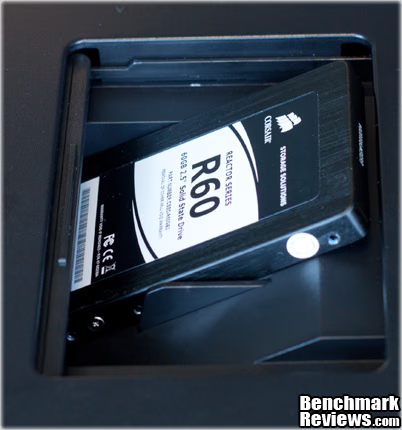
The Obsidian 650D has hidden away a external drive bay under the top of the 650D. It is able to use both 2.5" and 3.5" drives, providing users with up to SATA 6.0Gbps speeds, and if AHCI enabled, hot swap capabilities to users. One small annoyance is that the door used to cover this feature can be quite hard to close, and as my roomates looked at it they were afraid that it would be broken as they attempted to close it.

Due to the Obsidian 650D being raised off the ground by almost a inch, removing the PSU filter is quite easy. The filter is well made and looks like it can survive a trip through a dishwasher if it were ever needed. Yet again this little thing will help keep a users components running cooler, and which in turn will increase their longevity.

The Obsidian 650D has a easily removed filter for the front 200mm fan. Much like the front panel to remove this filter all a user would need to do is push on the top to unlock the filter. From there users can easily clean their filter to help their system retain optimum cooling peformance.

With a little more than 3/4" of space between the motherboard and the rear of the case the Obsidian 650D provides room for all of a users cables to routed through the back of the case and back out the front.
Closer Look: Interior
A well designed interior can make building and upgrading a system a joy rather than a tedious exercise. At the same time a well-made interior can also compliment a user's system making for aesthetically pleasing final product. The Obsidian 650D ticks both of these check marks making for both a beautiful and easy to work with case. So without further ado let's look at what makes this case such a joy to work with.
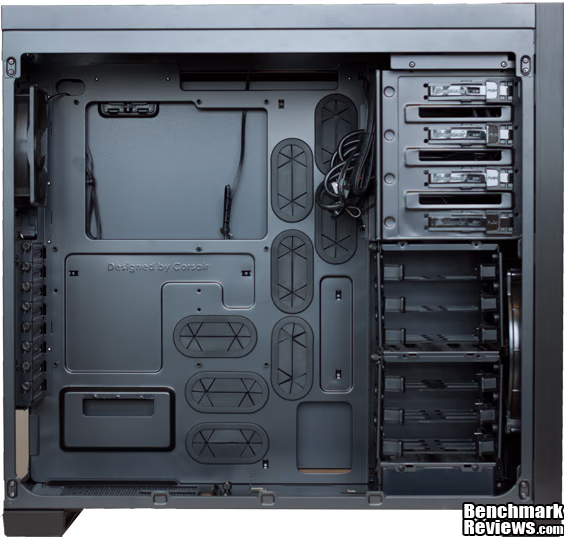
First and foremost one of the biggest joys about working with this case is the way in cable management is done. The rubber grommets provided help users cabling look nice once they have been run through the back of the case. At the same time it is nice to see that Corsair has painted the interior of the Obsidian 650D a matching black color to the exterior.

From the rear you can see that the Obsidian 650D has provided users with a very large opening with which to attach large coolers that would otherwise require motherboard removal to install. At the same time Corsair has also planned for all of users SSD's, and HDD's to run through the back of the case. For the most part this should provide no problems for users as Corsair has been very generous with the amount of room they have provided between tray and the back of the case.

As with many other modern cases the power supply of the 650D fits in the bottom of the case, while at the same time sitting upside down. This ensures that a user's power supply will have plenty of fresh filtered air to cool itself with. One interesting feature that Corsair has provided is a small adjustable retention clip for the front of power supplies. This serves a twofold purpose. First it makes installation a bit easier by lifting the PSU making it easier to align with the rear of the case. Second it helps provides stability if the case is moved by reinforcing the power supplies installation.

The Corsair comes with a pretty standard set of drive bays. Each drive caddy is easily removed by grabbing each of the clips up front. For users with extra long video cards the middle drive bay can be easily removed by removing the two thumb screws that hold it in place.
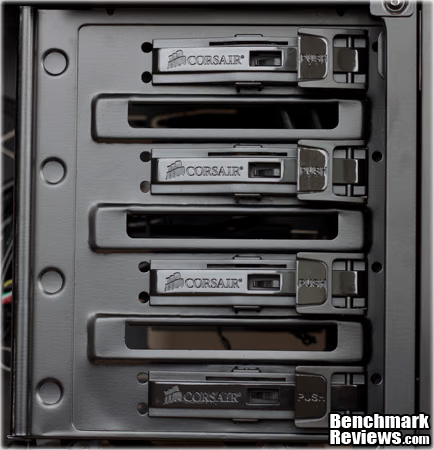
The quick release latches used on the 5.25" drive bays is sufficient to hold in users drives. It is easy to quickly add and remove drive with the simple flip of a switch. Sadly, the 650D has one of my biggest pet peeves in cases by only providing latches on one side of the case.
Detailed Interior Features
The small details of the interior of a case can really make a difference on what it is like to use in the long run. Nothing is worse then buying a case only to find that the fans are so anemic that they require replacing.

Both of the front and the top use the same 200mm fan. Sadly there are no official specifications and from what I have been able to gather the included fans should be rated 96 CFM at 30 dBA. At the same time this fan can be removed and replaced with either two 120mm or 140mm fans. One other options that many users who use this case may want to choose is to run a 240mm or 280mm radiator for water cooling.
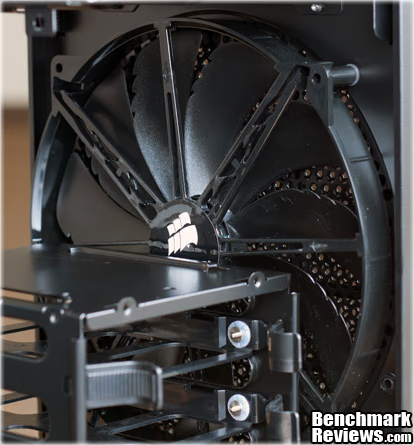
One unique feature about the 200mm fans used on the Obsidian 650D is that they are 200mm x 20mm rather the typical 200mm x 30mm. This means replacing these fans with higher performing fan especially in the front could pose a problem for many users.

The rear fan 120mm fan used on the 650D is also used on Corsairs all-in-one cooling products. It is a Corsair branded version of the D12SM-12 by Yate Loon and is rated at 70.5 CFM at 1650RPM. As with the other fans the 120mm fan has also been installed with rubber grommets which help prevent vibrations from the fan transferring to the case further cutting down on the noise of the system.
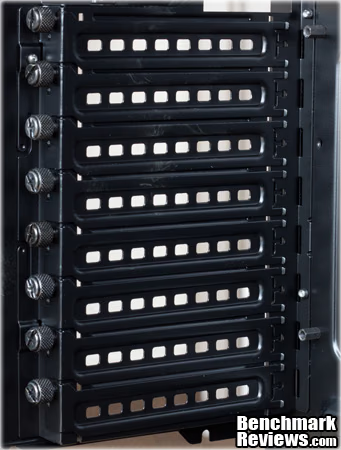
Corsair has provided thumbscrews for each of the eight expansion slots. This allows users to easily upgrade their systems with new PCI and PCI-e based accessories without needing to use a toolset.

One side note about the drive caddies that are provided is that users should be prepared to use right angle connections for both power and data. I found that while building into the 650D that my power connections coming from the power supply where in danger of breaking off the PCB board of SSD that I used.
Corsair 650D Final Thoughts
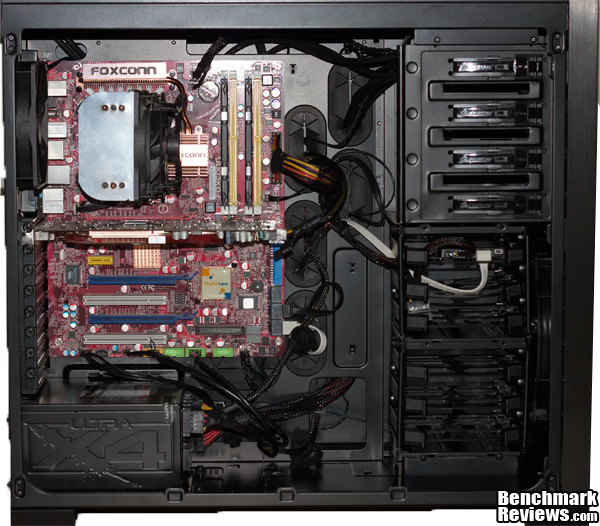
Overall building within the Obsidian 650D was a joy. Even though this is a "mid-tower" case building inside of it was easy due to it being so spacious. At the same time the Obsidian 650D provides plenty of room for expansion and system customization. I have seen some pretty radical alterations to the 650D to accommodate extreme water cooling setups using a radiator at every opening in the case. At the same time it is possible comfortably run a Quad-CrossFirex/SLI setup due to the eight expansion slots provided by the Obsidian 650D. To top that all off, using the provided space, cable management even done quickly is easy to do well and the included fans also each move large amounts of air while remaining quiet.
While nearly perfect there are some areas that could use improvement on the 650D. First it would be nice to see Corsair use a USB 3.0 header on future revisions instead of having users running a cable all the way through the back of the case. At the same time although rated as a "mid-tower" case it is as large as many full-tower cases including the Antec 1200. Overall though despite these minor inconveniences the 650D is well built, easy to work with, and beautiful.
Corsair 650D Conclusion
The performance of a case is all about its cooling prowess and the noise it makes while doing so. The 650D is setup to keep every system but the most extreme overclockers cool using two 200mm fans and one 120mm fan. These together provide a total of over 250CFM of air through this case. At the same time it does this while being one of the quietest systems I have worked with.
I love the steel, and brushed aluminum exterior of 650D. It provides a clean, sleek look that I that will fit into many situation whether it be a home office, a lounge, or a gamers den. It is a simple design that hides those quite powerful components that are stored on the interior. Aside from the obvious exterior Corsair has also painted the interior a matching black that will go well with many of the color schemes used on the more powerful motherboards on the market. To top off the painted interior the ease of cable management inside of the 650D will allow users to have a beautiful clean interior with only a couple hours of work. One thing that does break the clean looks of the system is the manner in which the USB 3.0 is setup. Rather than using a USB 3.0 header Corsair opted to run cabling all the way through the case and out the exterior to connect to the rear of the motherboard.
Like its older brother the construction of the 650D is superb with the steel interior providing structural integrity that prevents the system from warping or even creaking when your roomate decides it is a good place to sit. At the same time areas that normal show lack of strength such as the beams around the expansion slots are firm in this case with no warping as components are taken in and out of the case.
Functionality is all about future expandability of a case and the ability to adapt to what users may need. The Obsidian 650D easily will fulfill most users need by allowing for all but the largest of motherboards. Even more impressive, as of this writing every video card on the market will fit in the 650D. Even if GPU's continue to grow in size users can accommodate those just by removing one easily removed drives bays from the 650D. At the same time users to some extent can change the cooling configuration of the 650D by using different fan configurations. One thing that users should be aware of is the fact that both of the 200mm fans are 200mm x 20mm and for the front fan this may make it impossible to replace it with anything but a Corsair fan. On the other hand many users may ditch air cooling all together and use a water cooled setup. The 650D will easily accommodate many different cooling setups and would be an effective choice for a water cooled system.
Priced at $199.99 the Obsidian 650D is not cheap case but it does come with many nice features and is very well built. None the less many of the features on the 650D can be had in cases that cost much less. For example the Graphite 600T for the most part is identical to the Obsidian 650D, and yet it can be had for $135 with mail in rebate. For some users like me the more refined exterior of the 650D would be worth the price hike but for many others this will be a tough pill to swallow.
Overall my time spent with the 650D was wonderful. It was easy to work with, easy on the eye, and full of features that would be useful every time I needed to work on my system. Every person whom I have shown it to that currently owns the 800D says they wish that this was the size that the 800D had been. At the same time it is an expensive case and still very large especially for a "mid-tower" case. Non-the-less I would recommend the 650D to anyone who asked me about it, and if it were not for the fact that I love the Silverstone RV02 I currently use, I would be using it as my main case at this moment.
Pros:
+ Well built
+ Easy to work in
+ Great cable managment
+ Quiet
+ Gourgeous Exterior
+ Able to support complicated water cooling setups
Cons:
- Large for a "Mid-tower" case
- Unique fan size may be hard to replace
- Expensive enthusiast product
Ratings:
- Performance: 9.50
- Appearance: 9.50
- Construction: 9.50
- Functionality: 10
- Value: 8.00
Reader comments from the original article
24 comments were posted before commenting closed. They are preserved as written. Original avatars no longer resolve and are shown as a placeholder.
KING CHARLEY MACHICOTE Permalink:
Sounds like a mixed review.. it is a decent looking case nothing stands out to me . see no side cooling or venting holes for heat to release . There are some good ideas like the hard dive port on the top hidden cabling. but thats about it. The price is a little high for a case with basic improvments that should be standard at this time .. guess the price of aluminum had a lot to do with this...
RE:KING Austin Downing Permalink:
For most cases you do not want side cooling or venting holes. It is more effective to have unobstructed airflow through the case so that the exhaust fans can effectively remove all of the hot air.
peon CHARLEY MACHICOTE Permalink:
If you have a case you know that never happens the air input and exuast never equal each other .. and thats my case of point the air has to go some where unless you have your fans working overtime aginst each other.. but good luck with that
RE:PEON Austin Downing Permalink:
Of course, hence why builders either have a positive or negative airflow in their case. Which one is better will be a argument that will go on till the end of time nonetheless having a positive or negative pressure happens. I personally prefer a positive pressure in all of my cases to help keep dust, hair and such out of them. Still you do not want opening in the side of a case that will let that pressure out and will lead to a less effective cooling situation.
Side fans common Mergatroid Permalink:
Many of corsair's other cases have side mounted fans, and the 600 series has some versions that come with a side mesh able to mount four 120mm fans. Generally, people with more than one video card will want some type of side fan to help remove heat generated by the video cards (although not always), especially if the cards are non reference and exhaust some of their heat inside the case. As for pressure differences, the case will determine which is best in any particular instance, and generally a temperature probe from a fan controller will settle any arguments.
Expensive, but nice Nate Swetland Permalink:
Nice review. Overall, I like the case. I really like all of the cable routing options. I like that you can remove the middle drive cage in case you have lager VGA cards, or simply don't need it. I can't say that I am fond of the top external drive bay. It seems like something that not everyone would be interested in, and just adds to the cost. I like the front I/O panel, its nice that you can close it, and it is nice that it is on the front instead of the top or side. Can you install the hard drives backwards to allow the cables to go behind the motherboard? Sorry if you addressed this, I didn't see if you mentioned it or not. Overall, I think it is nice, but it really would need to drop a bit in price before I would become seriously interested in it.
Yes Mergatroid Permalink:
Actually, if you install the drives with the cables sticking out the left side you've installed them backwards and may have a hard time removing them. The 3.5" drive cages can be completely removed, or one drive cage can be mounted directly in front of the PSU so the space behind the front 200mm fan is completely empty.
HDD Austin Downing Permalink:
Nate I discussed that, I found that for the PSU I used since it did not have thin, or 90 degree power connections, I was running into the possibility of snapping off the PCB from my SSD. I decided it was a better idea to install it backwards in order to mitigate this problem
average joe CHARLEY MACHICOTE Permalink:
your right about the positive and negative aspect of this . don't know if you have seen the airboy case its a giant mesh case .. air flow everywhere.. but since water cooling has become so effective all you relly need is to cool the motherboard fans that cool radiators mounted on top of case not inside of case ..this would be a good case for water cooling..maybe some one should test out both and have a honest rating temperature cooling all around. I myself can not afford to do it so I leave it to benchmark reviews to find some one who has done the research or do it themselfs .. case I maybe wrong and you right..
Front Panel Connectors endocine Permalink:
Is it possible to remove the front panel connectors cable bundle?
yes Mergatroid Permalink:
You can completely remove the front panel circuit board of you choose, or you can unplug and remove any cables you don't want.
RE: Corsair Obsidian 650D Computer Case Austin Downing Permalink:
Not that I can tell, any particular reason you would want to?
Cable glut endocine Permalink:
cable glut, i never use the front panel connectors. maybe i should start doing so, but i've noticed that most cases use really cheap cables for them. Case manufacturers should make these things plugabble. im totally fine with running a USB hub to my desk from a built in port on the back.
Cable Glut Bruce Bruce Permalink:
I like that term... I've actually cut off some of the cables leading to the front (or top) I/O connectors on some builds, just to get rid of the annoyance. Firewire is usually the first to go....
High quality panel connectors Mergatroid Permalink:
The front panel connectors on Corsair cases are high quality, and you will get as good or better results from them as you would from any hub. They will not cause problems hubs can cause because they run directly to the USB connectors on the main board. Also, the audio is full HD audio, and can be programmed separately from the connectors at the rear of your motherboard so you can have a separate audio channel running to the front (for headphones running voice communications) while still having other audio running out your speakers (such as game sounds or music).
RE: Corsair Obsidian 650D Computer Case Austin Downing Permalink:
I found that on these 650D the cables are of very nice quality. And even if they are ugly they can be run behind the motherboard so that they can be out of site and out of mind.
I Like It Tom Permalink:
i like that the case is wide, compared to other cases, to accommodate tall CPU coolers, and i like the plain, and "square", utilitarian look of the case.. it is close to what i would want in a case.. it is amazing to me that such a case is so hard to find..
RE: I Like It Austin Downing Permalink:
Cases like this are not hard to find. It is more like cases like this that don't cost a arm and a leg are hard to find.
Internal Temperatures Tim Permalink:
So, do you have any screenshots of the air temperatures inside the case while it is running?
RE: Internal Temperatures Austin Downing Permalink:
Unfortunately no. What cases are you looking to compare it to?
Good review Mergatroid Permalink:
Overall a good review of a good case. If I didn't already own a 600T I might pick up a 650D. The only advantage the 600T has is the space on the top. I was able to mod the 600T so I could fit an H100 rad up top with four fans in push/pull, something you couldn't do on the 650D without putting a set of fans outside the case. I like the looks of the 650D better though. Corsair has done a great job with their mid tower cases.
Harley_Squirrelnuts Martin Permalink:
Like the case but the fan controller is terrible. I used the four outlets to power the two casing fans and the two fans on the Corsair H100 water cooler. Two months into ownership and the controller speed became erratic, surging and slowing. A week after that it quit. Corsair provided a replacement at no cost. Thanks! Same routine, quit after two months. I have read on bulletin boards that this is common. Controller overheats and burns out. Now I have ordered a Kaze II fan controller.
Same on the 600T Mergatroid Permalink:
Many people have said the same thing of the Corsair 600T fan controller as well. Personally, I prefer aftermarket fan controllers over controllers built into cases, so I never bothered using the controller in my own 600T. The Kaze Master II is a great choice for this case.
RE: Corsair Obsidian 650D Computer Case rk86 Permalink:
Since my mobo has a USB 3.0 header, i got one of the usb3 internal to external parts with a 50cm cable online for $4, removed the hard cover off the cable ends, and replaced the USB3 ports.