
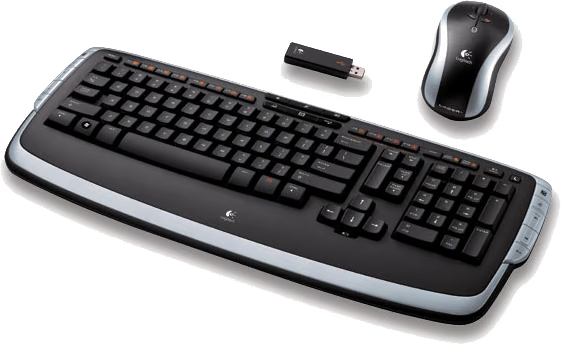
Logitech Cordless Desktop LX 710 Keyboard & Laser Mouse
Logitech LX 710
Very few computer users can say that they don't have a personal preference when it comes to peripheral equipment. No matter what the circumstance, every person who has ever sat behind a computer decides within a few seconds if they either like or dislike the equipment in front of them. Sometimes it takes little more then placing your hand over the mouse to discover if it will become friend or foe.
Consider just over four years ago at the end of the beige box era, most peripheral equipment was color matched to the vanilla ensemble surrounding it. It was a pathetic situation that was slowly trying to make itself better in no hurry. You really had no more than two color choices, and wireless was still a mess. Then without warning, the market turned away from IBM-clone beige boxes and into the custom painted, cooled, and lit products we computer enthusiasts take for granted today.
So it makes solid sense that at the very top of the big three most personal peripheral devices is the mouse, the keyboard, and then the display. I work on several computers every day in various environments, and I am witness to the snap judgment relegating clients hardware to my mental trash bin. Thankfully (for everyone, but mostly me), there is a booming market fighting for your desk space. Even the most discerning individual can find a comfortable match to his or her preferences; which is saying a lot.
Logitech has been around long enough to be considered a pioneer in the peripheral hardware industry. Originally producing products for top-tier OEM's such as Dell, the retail market soon followed; and not long afterwards people like me had three-piece 2.1 speaker systems with optical pointing devices and multi-function keyboards. Through constant innovation and persistent trail-and-error research with new product styles Logitech has helped to shape the peripheral hardware industry as we know it today. Continuing in their evolving development of consumer preferred products, Logitech offers the Cordless Desktop LX 710 Laser mouse and keyboard set designed for multitasking professionals.
About the Company: Logitech
Logitech is a world leader in personal peripherals, driving innovation in PC navigation, Internet communications, digital music, home-entertainment control, gaming and wireless devices. The company's products combine essential core technologies, continuing innovation, award-winning industrial design and excellent price performance.
Logitech International is a Swiss public company traded on the SWX Swiss Exchange under the symbol LOGN and on the Nasdaq Global Select Market under the symbol LOGI. In January 2007, Logitech was added to the NASDAQ-100 Index.
Logitech's origins lie in the OEM sector, which remains an important part of its business, and represented 11.6 percent of the company's total sales in Fiscal 2006. To meet the demands of its OEM customer base, which includes most of the world's largest PC manufacturers, Logitech offers high-volume manufacturing with focused quality control, worldwide distribution and logistics, and the ability to leverage its infrastructure under changing demand conditions.
Logitech continues to broaden its product offering and its presence in the retail sector. This is fueled by a trend among consumers to enhance their basic PC systems with more fully featured personal peripherals that add functionality and cordless freedom to their desktops. They are also purchasing supplementary devices designed for new applications and specific purposes such as gaming, multimedia, or audio and visual communication over the Internet. Further, Logitech's retail business includes personal peripherals for platforms beyond the PC, such as gaming consoles, portable music players, mobile phones and home-entertainment systems.
Today, Logitech's retail business accounts for 88.4 percent of its revenue. To provide the market with a broadening array of best-of-category products, Logitech's business model calls for supplementing its internal engineering and manufacturing strength with additional products and technologies through a combination of strategic acquisitions and industry partnerships.
More information about Logitech is available on their company website.
Questions? Comments? Please visit the Benchmark Reviews Discussion Forum with your thoughts.
Closer Look: LX 710 Cordless Keyboard
In a world where people are tied to their mouse and keyboard longer and more often then they stand on their own feet, being productive means taking shortcuts as often as they can possibly be made. Keyboards are no longer just a simple 104-key set of letters and numbers. In today's busy world of multitasking graphic artists and spreadsheet macro accountants, the keyboard has become a virtual mission control with every command presence necessary to wage everything from war to world wide web browsing. If it doesn't have hot keys built in, then it probably still has a cord and beige appearance.
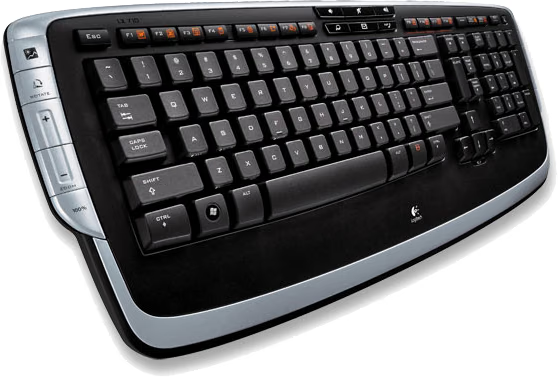
Logitech comes to the rescue with the Cordless Desktop LX 710 cordless keyboard and Laser mouse set. With an array of function buttons and hot keys on the LX 710 Cordless Keyboard, you can save time by letting a single finger stroke do the work of many. Internet communication has been made simple with handy controls for launching email, messaging, or Internet call applications, and for adjusting volume. Even the side mounted control keys give quick access to your multimedia applications, so anything from Apple iTunes to Windows Media Player will open with a single key press. Now all that time saved can be converted into time spent relaxing; or if you are a workaholic it will help you become more productive.

The Logitech LX 710 also introduces some brand new features not previously seen on keyboards. Windows Vista users will still enjoy the Start key, but now they also have and have a handy DocFlip control, which help get the most out of the new Vista Operating System. Additional controls give you direct access to the new advanced features in Windows Vista - such as the previously mentioned Document Flip - and they'll also work on Windows XP. Logitech packs these features onto the already bulging list of functionality tools available to Windows XP computers. However, It should be mentioned that the hot keys and command buttons will only work with the included software, which supports Windows XP and Vista.


When I looked at the underside of the LX 710, I expected to find the same usual and uneventful design that everyone uses. However, unlike your average keyboard, the Logitech Cordless Desktop LX 710 cordless keyboard is user friendly in more ways than one. While nearly every other keyboard on the market has only two resting positions on the support legs (folded in or out) the LX710 has three different angles available. The 3-way adjustable tilt legs enable a truly personalized experience, allowing the keyboard angle which maximizes comfort and matches your style. Although not marketed as a gamers keyboard, it seemed to really work well for me in the most extended support leg position.
Features
Adjustable keyboard angles
3-way adjustable tilt legs enable a truly personalized experience. Choose the keyboard angle that maximizes your comfort and matches your style.
Programmable hot-keys
Convenient hot-keys instantly open applications, games, folders, and web pages. To customize, simply hold down the desired hot-key with a long press.
Cordless laser mouse
Edit photos with pixel precision, or use other features such as vertical or horizontal scrolling, or one-touch zoom.
Instant Access to Your Music
Powerful, side-mounted controls give quick access to your favorite media applications, including Apple iTunes or Windows Media Player.
One-Touch Communication
Stay in touch with a single touch. Manage your Internet communications with handy controls for launching email, messaging, or Internet call applications, and for adjusting volume.
Ready for Windows Vista
Start key and handy DocFlip controls let you get the most out of Windows Vista. Great for Windows XP, too.
Premium comfort
Integrated soft-touch palm rest provides premium comfort and extra support, and can help reduce fatigue.
Specifications
System Requirements
PC with Windows XP or Windows Vista
1 available USB port
CD-ROM drive
Package Contents
Logitech LX 710 Cordless Keyboard
Logitech LX 7 Cordless Laser Mouse
USB mini-receiver
4 AA alkaline batteries
CD with software, comfort guidelines, and help center
Quick-start guide
Full product support
5-Year limited hardware warranty
Questions? Comments? Please visit the Benchmark Reviews Discussion Forum with your thoughts.
Closer Look: LX7 Cordless Laser Mouse
As if the tricked-out LX 710 keyboard with multitasking hotkey features at every corner wasn't enough to box up and sell as a standalone product, Logitech takes no chance with consumer tastes and includes the matched LX7 Cordless Laser Mouse with the set.
For the past year I have been using Logitech's G5 gaming mouse. In comparison, the LX7 feels nearly the same with very small (and hardly noticeable) differences. First, the LX7 isn't designed with selectable laser resolution, so it may not switch between gaming and other tasks quite as nice. Second, the buttons feel as though they require a little more pressure as opposed to the (much more expensive) G5.
Very similar to many of the already popular Logitech mice, the LX7 cordless optical laser mouse utilizes a 1100 dpi laser which is suitable for all desktop needs as well as most gaming demands. During my testing, I found that this was far more than the average person would make use of; however gamers may be a little more selective in choosing a mouse as they are used to the 2200 dpi industry standard.
|
The Logitech LX7 Cordless Optical Mouse offers an experience of true cordless freedom. It features a wireless mini-receiver, which installs effortlessly. This compact receiver helps eliminate desktop clutter, and works with either notebook or desktop PCs. 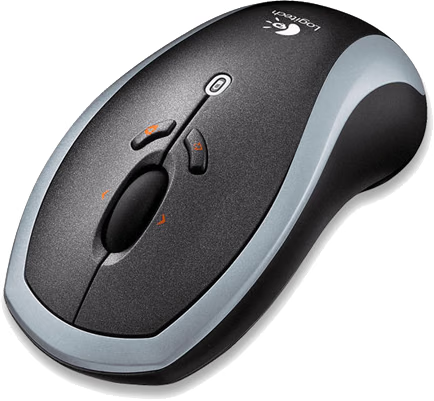
Smart power management extends battery life up to 8 months - or even more if you use the On/Off button. The battery indicator light gives you plenty of advance notice when it's time to change batteries. Alkaline batteries are included, which means that the LX7 is not a rechargeable unit. The soft-touch rubber grip and contoured shape provide natural comfort. Tilt Wheel Plus Zoom is perfect for viewing digital photos and spreadsheets. Instantly zoom in or out, and scroll horizontally and vertically without moving your mouse. Forward/Back buttons speed browsing web sites and documents. A full 5-year warranty and Logitech's master-technician product support mean that you can buy without worry. Here are a few other key features for the LX7:
|
|||||||||||
|
|
|
|
||
|---|---|---|---|
|
|
|
||
|
High-definition optical technology |
|
Questions? Comments? Please visit the Benchmark Reviews Discussion Forum with your thoughts.
Conclusion: Logitech LX 710
Since Logitech is already an establish leader in the peripheral equipment industry, it doesn't come as a big surprise to me that they have produced yet another great product. Focused at the multitasking desktop publisher or super user, the Logitech Cordless Desktop LX 710 Laser mouse and keyboard set offers more than enough performance for even the most demanding critic (like me).
Certainly, I am aware of the Logitech product line, which includes an enormous list of products ranging from general purpose to enthusiast/gamer grade, and the Logitech Cordless Desktop LX 710 set clearly weighs in at the performance end of their product spectrum. Individually, or as a set, the Logitech Cordless Desktop LX 710 Laser mouse and keyboard presents a very wide range of specal features which are certain to impress even the most demanding users.

Despite a list of features that designate this a premium product, Logitech offers the Cordless Desktop LX 710 set at a tremendous value. Available now at NewEgg.com for only $64.75, there is more performance and value packed into this set than I have seen in a very long time. When I take into consideration that certain keyboards and mice sell separately for more then the price of this entire set, it seems logical that this could very well become the next standard feature for OEM's to offer as an (inexpensive) upgrade. For everyone else, this is simply a steal.

So by now it should be crystal clear that I firmly recommend (and suggest) the Logitech Cordless Desktop LX 710 Laser mouse and keyboard set. Until I can find a better product at a better price, this set will easily fit into my most recommended products list. In case you are still not sure, let me put a different way. If you are shopping for a new cordless keyboard and mouse, and you are looking for a feature rich keyboard and gamer-quality mouse for the lowest price possible, then you need to visit NewEgg.com and buy this set. I guarantee that I have never made a more solid recommendation.
Pros:
+ Extremely capable hot key design
+ Excellent control key set
+ Fully functional multimedia controls
+ Convenient Start key and DocFlip controls
+ 3-way adjustable tilt keyboard legs
+ Long range wireless transmission
+ Excellent power management
+ Attractive design and polished finish
Cons:
- LX7 would be perfect with a 2000 dpi laser and selector
Ratings:
-
Presentation: 9.0
-
Appearance: 9.25
-
Construction: 9.0
-
Functionality: 9.25
-
Value: 9.5
Final Score: 9.2 out of 10.
Award: Benchmark Reviews Golden Tachometer Award.
Questions? Comments? Please visit the Benchmark Reviews Discussion Forum with your thoughts.
Reader comments from the original article
4 comments were posted before commenting closed. They are preserved as written. Original avatars no longer resolve and are shown as a placeholder.
mr mark needham Permalink:
could you please send the information on how to download the drivers to activate the lx 710 keyboard
Not happy Maarten Permalink:
After using this keyboard for about 6 months, several buttons became unreadable, the characters just came off.. i think it's really sad, next year i'll have a keyboard with empty buttons on it..
Not Pleased Lucien Permalink:
This is my second LX 710. First one replaced because buttons unreadable. Guess what, have now lost e, a, t, i, o and r.
Become unstable after use 1 year fareezex Permalink:
the keyboard become unreadable.. zzzzzzz