

| MSI N460GTX HAWK GeForce GTX 460 |
| Reviews - Featured Reviews: Video Cards | ||||||||||||||||||||||||||||||||||||||||||||||||||||||||||||||||||||||||||||||||||||||||||||||||||||||||||||||||||||||||||||||||||||||||||||||||||||||||||||||||||||||||||||||||||||||||||||||||||||||||||||||||||||||||||||||||||||||||||||||||||||||||||||||||||||||||||||||||||||||||||||||||||||||||||||||||||||||||||||||||||||||||||||||||||||||||||||||||||||||||||||||||||||||||||||||||||||||||||||||||||||||||||||||||||||||||||||||||||||||||||||||||||||||||||||||||||||||||||||||||||||||||||||||||||||||||||||||||||||||||||||||||||||||||||||||||||||||||||||||||||||||||||||||||||||||||||||||||||||||||||||||||||||||||||||||||||||||||||||||||||||||||||||||||||||||||||||||||||||||||||||||||||||||||||||||||||||||||||||||||||||||||||||||||||||||||||||||||||||||||||||||||||||||||||||||||||||||||||||||||||||||||||||||||||||||||||||||||||||||||||||||||||||||||||||||||||||||||||||||||||||||||||||||||||||
| Written by Bruce Normann | ||||||||||||||||||||||||||||||||||||||||||||||||||||||||||||||||||||||||||||||||||||||||||||||||||||||||||||||||||||||||||||||||||||||||||||||||||||||||||||||||||||||||||||||||||||||||||||||||||||||||||||||||||||||||||||||||||||||||||||||||||||||||||||||||||||||||||||||||||||||||||||||||||||||||||||||||||||||||||||||||||||||||||||||||||||||||||||||||||||||||||||||||||||||||||||||||||||||||||||||||||||||||||||||||||||||||||||||||||||||||||||||||||||||||||||||||||||||||||||||||||||||||||||||||||||||||||||||||||||||||||||||||||||||||||||||||||||||||||||||||||||||||||||||||||||||||||||||||||||||||||||||||||||||||||||||||||||||||||||||||||||||||||||||||||||||||||||||||||||||||||||||||||||||||||||||||||||||||||||||||||||||||||||||||||||||||||||||||||||||||||||||||||||||||||||||||||||||||||||||||||||||||||||||||||||||||||||||||||||||||||||||||||||||||||||||||||||||||||||||||||||||||||||||||||||
| Friday, 24 September 2010 | ||||||||||||||||||||||||||||||||||||||||||||||||||||||||||||||||||||||||||||||||||||||||||||||||||||||||||||||||||||||||||||||||||||||||||||||||||||||||||||||||||||||||||||||||||||||||||||||||||||||||||||||||||||||||||||||||||||||||||||||||||||||||||||||||||||||||||||||||||||||||||||||||||||||||||||||||||||||||||||||||||||||||||||||||||||||||||||||||||||||||||||||||||||||||||||||||||||||||||||||||||||||||||||||||||||||||||||||||||||||||||||||||||||||||||||||||||||||||||||||||||||||||||||||||||||||||||||||||||||||||||||||||||||||||||||||||||||||||||||||||||||||||||||||||||||||||||||||||||||||||||||||||||||||||||||||||||||||||||||||||||||||||||||||||||||||||||||||||||||||||||||||||||||||||||||||||||||||||||||||||||||||||||||||||||||||||||||||||||||||||||||||||||||||||||||||||||||||||||||||||||||||||||||||||||||||||||||||||||||||||||||||||||||||||||||||||||||||||||||||||||||||||||||||||||||
MSI N460GTX HAWK Video Card ReviewThe slew of NVIDIA GTX 460 video cards that hit the market in the last month was impressive. Everybody wanted as much of the pie as they could get, which was not surprising given the level of performance that the GTX460 offers for so little cash. On almost every level, the GTX 460 was a game-changer for Fermi. Some vendors weren't satisfied with just putting a label on the reference design, and MSI is one of them. They have at least two different non-reference designs, with some variations of each available. The N460GTX HAWK we're looking at today is a completely new board design with some advanced features no one else can match. They have also adapted their well-regarded Twin Frozr cooling design for the HAWK, even bumping up the heat pipe count to four, which provides good coverage for the NVIDIA heat spreader, that's much larger than comparable ATI GPU packages.
MSI N460GTX HAWK GeForce GTX 460Software control of a video card's clocks and core voltage is the fastest and easiest way to improve its performance. MSI Afterburner is one of the best monitoring and control software products available, and MSI's latest version brings voltage control to all aspects of the GTX 460 design. With so much apparent thermal headroom available on the GTX 460, the ability to bump up the core voltage on the GPU is quite useful. Until now, most overclocking enthusiasts were left without a way to increase memory voltage, and were held back a bit by the performance of the Samsung GDDR5 parts running on stock voltage. To add some icing to the cake, version 2.0 of MSI Afterburner also allows the PLL system to be pushed harder, as well. This ensures that the components that are used in setting the actual clock rates are stable, as well. Add in a large and dense fin assembly, four heat pipes and twin fans, and you have a recipe for generous overclocks. Let's take a complete look, inside and out, at the MSI N460GTX HAWK and then run it through Benchmark Review's full test suite. We're going to look at how this overclocked edition performs with a 780 MHz factory overclock, and then push it even further. There should be lots of headroom available, and if I'm lucky, I may be able to approach the world record holder for overclocking the GTX 460 GPU on air, who got 1.0 GHz with this same exact model
Manufacturer: Micro-Star Int'l Co., Ltd Full Disclosure: The product sample used in this article has been provided by MSI. NVIDIA GeForce GTX460 GPU FeaturesThe features of the GF104 GPU contained in the N460GTX are fully comparable with the latest offerings from both major GPU camps. We've been using most of these, or similar technologies, on Radeon 5xxx cards since last September, now we have rough parity in GPU features. Here are the Features and Specifications directly related to the GPU, as provided by the manufacturer, NVIDIA:
Microsoft DirectX 11 SupportDirectX 11 GPU with Shader Model 5.0 support designed for ultra high performance in the new API's key graphics feature, GPU-accelerated tessellation. NVIDIA PhysX TechnologyFull support for NVIDIA PhysX technology, enabling a totally new class of physical gaming interaction for a more dynamic and realistic experience with GeForce. NVIDIA 3D Vision Ready*GeForce GPU support for NVIDIA 3D Vision, bringing a fully immersive stereoscopic 3D experience to the PC. A combination of high-tech wireless glasses and advanced software, 3D Vision transforms hundreds of PC games into full stereoscopic 3D. In addition, you can watch 3D movies and 3D digital photographs in eye popping, crystal-clear quality. NVIDIA 3D Vision Surround Ready**Expand your games across three displays in full stereoscopic 3D for the ultimate "inside the game" experience with the power of NVIDIA 3D Vision and SLI technologies. NVIDIA Surround also supports triple screen gaming with non-stereo displays. NVIDIA CUDA TechnologyCUDA technology unlocks the power of the GPU's processor cores to accelerate the most demanding tasks such as video transcoding, physics simulation, ray tracing, and more, delivering incredible performance improvements over traditional CPUs. NVIDIA SLI Technology***Industry leading NVIDIA SLI technology offers amazing performance scaling for the world's premier gaming solution. 32x Anti-aliasing TechnologyLightning fast, high-quality anti-aliasing at up to 32x sample rates obliterates jagged edges. NVIDIA PureVideo HD Technology****The combination of high-definition video decode acceleration and post-processing that delivers unprecedented picture clarity, smooth video, accurate color, and precise image scaling for movies and video. PCI Express 2.0 SupportDesigned for the new PCI Express 2.0 bus architecture offering the highest data transfer speeds for the most bandwidth-hungry games and 3D applications, while maintaining backwards compatibility with existing PCI Express motherboards for the broadest support. Dual-link DVI SupportAble to drive industry's largest and highest resolution flat-panel displays up to 2560x1600 and with support for High-bandwidth Digital Content Protection (HDCP). HDMI 1.4a Support*****
Fully integrated support for HDMI 1.4a including GPU accelerated Blu-ray 3D4 support, xvYCC, deep color, and 7.1 digital surround sound including Dolby TrueHD and DTS-HD. Upgrade your GPU to full 3D capability with NVIDIA 3DTV Play software, enabling 3D gaming, picture viewing and 3D web video streaming. See www.nvidia.com/3dtv for more details.
* NVIDIA 3D Vision requires 3D Vision glasses and a 3D Vision-Ready monitor. See www.nvidia.com/3dvision for more information.
** NVIDIA 3D Vision Surround require two or more graphics cards in NVIDIA SLI configuration, 3D Vision glasses and three matching 3D Vision-Ready displays. See www.nvidia.com/surround for more information. *** A GeForce GTX 460 GPU must be paired with another GeForce GTX 460 GPU (graphics card manufacturer can be different) with the same frame buffer size. SLI requires sufficient system cooling and a compatible power supply. Visit www.slizone.com for more information and a listing of SLI-Certified components. **** Supported video software is required to experience certain features. ***** Blu-ray 3D playback requires the purchase of a compatible software player NVIDIA GeForce GTX 460 GPU SpecificationsGPU Engine Specs (1GB model at 780MHz): |
||||||||||||||||||||||||||||||||||||||||||||||||||||||||||||||||||||||||||||||||||||||||||||||||||||||||||||||||||||||||||||||||||||||||||||||||||||||||||||||||||||||||||||||||||||||||||||||||||||||||||||||||||||||||||||||||||||||||||||||||||||||||||||||||||||||||||||||||||||||||||||||||||||||||||||||||||||||||||||||||||||||||||||||||||||||||||||||||||||||||||||||||||||||||||||||||||||||||||||||||||||||||||||||||||||||||||||||||||||||||||||||||||||||||||||||||||||||||||||||||||||||||||||||||||||||||||||||||||||||||||||||||||||||||||||||||||||||||||||||||||||||||||||||||||||||||||||||||||||||||||||||||||||||||||||||||||||||||||||||||||||||||||||||||||||||||||||||||||||||||||||||||||||||||||||||||||||||||||||||||||||||||||||||||||||||||||||||||||||||||||||||||||||||||||||||||||||||||||||||||||||||||||||||||||||||||||||||||||||||||||||||||||||||||||||||||||||||||||||||||||||||||||||||||||||


|
Graphics Card |
Cores |
Core Clock |
Shader Clock |
Memory Clock |
Memory |
Interface |
| XFX Radeon HD5750 (HD-575X-ZNFC) |
720 |
700 |
N/A |
1150 |
1.0GB GDDR5 |
128-bit |
| ATI Radeon HD5770 (Engineering Sample) |
800 |
850 |
N/A |
1200 |
1.0GB GDDR5 |
128-bit |
| XFX Radeon HD5830 (HD-583X-ZNFV) |
1120 |
800 |
N/A |
1000 |
1.0GB GDDR5 |
256-bit |
|
ASUS GeForce GTX 260 (ENGTX260 MATRIX) |
216 |
576 |
1242 |
999 |
896MB GDDR3 |
448-bit |
| NVIDIA GeForce GTX460-768 (Engineering Sample) |
336 |
675 |
1350 |
900 |
768 MB GDDR5 |
192-bit |
|
XFX Radeon HD5850 (21162-00-50R) |
1440 |
725 |
N/A |
1000 |
1.0GB GDDR5 |
256-bit |
|
MSI N460GTX HAWK (V238) |
336 |
780 |
1560 |
900 |
1.0GB GDDR5 |
256-bit |
|
ASUS GeForce GTX 285 (MATRIX GTX285) |
240 |
662 |
1476 |
1242 |
1.0GB GDDR3 |
512-bit |
|
XFX Radeon HD5870 (HD-587X-ZNFC) |
1600 |
850 |
N/A |
1200 |
1.0GB GDDR5 |
256-bit |
|
ASUS Radeon HD5870-OC (EAH5870/2DIS/1GD5/V2) |
1600 |
1000 |
N/A |
1250 |
1.0GB GDDR5 |
256-bit |
-
XFX Radeon HD5750 (HD-575X-ZNFC - Catalyst 8.732.0.0)
-
ATI Radeon HD5770 (Engineering Sample - Catalyst 8.732.0.0)
-
XFX Radeon HD5830 (HD-583X-ZNFV - Catalyst 8.732.0.0)
-
NVIDIA GeForce GTX460-768 (Engineering Sample: Forceware v258.96)
-
XFX Radeon HD5850 (21162-00-50R - ATI Catalyst 8.732.0.0)
-
MSI N460GTX HAWK (V238 - Forceware v258.96)
-
ASUS GeForce GTX 260 (ENGTX260 MATRIX - Forceware v197.45)
-
ASUS GeForce GTX 285 (GTX285 MATRIX - Forceware v197.45)
-
XFX Radeon HD5870 (HD-587X-ZNFC - Catalyst 8.732.0.0)
-
ASUS Radeon HD5870 (EAH5870/2DIS/1GD5/V2) - Catalyst 8.732.0.0)
3DMark Vantage Performance Tests
3DMark Vantage is a computer benchmark by Futuremark (formerly named Mad Onion) to determine the DirectX 10 performance of 3D game performance with graphics cards. A 3DMark score is an overall measure of your system's 3D gaming capabilities, based on comprehensive real-time 3D graphics and processor tests. By comparing your score with those submitted by millions of other gamers you can see how your gaming rig performs, making it easier to choose the most effective upgrades or finding other ways to optimize your system.
There are two graphics tests in 3DMark Vantage: Jane Nash (Graphics Test 1) and New Calico (Graphics Test 2). The Jane Nash test scene represents a large indoor game scene with complex character rigs, physical GPU simulations, multiple dynamic lights, and complex surface lighting models. It uses several hierarchical rendering steps, including for water reflection and refraction, and physics simulation collision map rendering. The New Calico test scene represents a vast space scene with lots of moving but rigid objects and special content like a huge planet and a dense asteroid belt.
At Benchmark Reviews, we believe that synthetic benchmark tools are just as valuable as video games, but only so long as you're comparing apples to apples. Since the same test is applied in the same controlled method with each test run, 3DMark is a reliable tool for comparing graphic cards against one-another.
1680x1050 is rapidly becoming the new 1280x1024. More and more widescreen are being sold with new systems or as upgrades to existing ones. Even in tough economic times, the tide cannot be turned back; screen resolution and size will continue to creep up. Using this resolution as a starting point, the maximum settings were applied to 3DMark Vantage include 8x Anti-Aliasing, 16x Anisotropic Filtering, all quality levels at Extreme, and Post Processing Scale at 1:2.
3DMark Vantage GPU Test: Jane Nash

Our first test shows the GTX460 placed right where NVIDIA wants it. The 768MB part is trading blows with the HD 5830 and the 1 GB part is going toe-to-toe with the HD 5850. If you think this is aiming a little too high, check out my Final Thoughts. The MSI N460GTX is overclocked from the factory, and I am showing the results from these factory settings. But we already know this chips an overclocking monster, so I've shown those results, too. I put those 950 MHZ core results right next to the HD 5870 results, for what will become more and more obvious reasons, as you continue reading the test results. The big hitch in the graph is caused by the older GT200-based cards, which I am including for reference in case you want to see whether it's worth upgrading. The synthetic results overwhelmingly say: Yes.

At 1920x1200 native resolution, things look much the same as they did at the lower screen size; just the absolute values are lower, the ranking stays the same. One thing you may have noticed is how well the HD 5830 does on this test, compared to the HD 5770. That issue has been beat to death, but I mention it to demonstrate that the GTX460 beats the HD 5830 even when it has everything going for it. All the choices seem choppy at times, as none of them manages to break the 30 FPS barrier. Let's take a look at test#2, which has a lot more surfaces to render, with all those asteroids flying around the doomed planet New Calico.
3DMark Vantage GPU Test: New Calico

In the medium resolution New Calico test, the moderately overclocked MSI N460GTX HAWK does so well that it edges out an ATI HD 5850 with base clocks. That's an impressive feat for a card in this price range. The overclock results show that synthetic performance scales linearly with higher clock rates, just as you would suspect. At the max overclock, the GTX460 passes by a stock HD 5870, but none get over 30 FPS in this medium-resolution benchmark, which shows how tough this test really is.

At a higher screen resolution of 1920x1200, the MSI HAWK with its factory OC keeps its slim lead over the HD 5850, by less than 2 FPS. Even the fastest single GPU cards have trouble rendering this scene, with an average frame rate in the low 20s. Soon this benchmark suite may be replaced with DX11-based tests, but in the fading days of DX10 it has been a very reliable benchmark for high-end video cards.
We need to look at some actual gaming performance to verify these results, so let's take a look in the next section, at how these cards stack up in the standard bearer for gaming benchmarks, Crysis.
|
Graphics Card |
Processor |
Core Clock |
Shader Clock |
Memory Clock |
Memory |
Memory |
| XFX Radeon HD5750 (HD-575X-ZNFC) |
720 |
700 |
N/A |
1150 |
1.0GB GDDR5 |
128-bit |
| ATI Radeon HD5770 (Engineering Sample) |
800 |
850 |
N/A |
1200 |
1.0GB GDDR5 |
128-bit |
| XFX Radeon HD5830 (HD-583X-ZNFV) |
1120 |
800 |
N/A |
1000 |
1.0GB GDDR5 |
256-bit |
|
ASUS GeForce GTX 260 (ENGTX260 MATRIX) |
216 |
576 |
1242 |
999 |
896MB GDDR3 |
448-bit |
| NVIDIA GeForce GTX460-768 (Engineering Sample) |
336 |
675 |
1350 |
900 |
768 MB GDDR5 |
192-bit |
|
XFX Radeon HD5850 (21162-00-50R) |
1440 |
725 |
N/A |
1000 |
1.0GB GDDR5 |
256-bit |
|
MSI N460GTX HAWK (V238) |
336 |
780 |
1560 |
900 |
1.0GB GDDR5 |
256-bit |
|
ASUS GeForce GTX 285 (MATRIX GTX285) |
240 |
662 |
1476 |
1242 |
1.0GB GDDR3 |
512-bit |
|
XFX Radeon HD5870 (HD-587X-ZNFC) |
1600 |
850 |
N/A |
1200 |
1.0GB GDDR5 |
256-bit |
|
ASUS Radeon HD5870-OC (EAH5870/2DIS/1GD5/V2) |
1600 |
1000 |
N/A |
1250 |
1.0GB GDDR5 |
256-bit |
Crysis Performance tests
Crysis uses a new graphics engine: the CryENGINE2, which is the successor to Far Cry's CryENGINE. CryENGINE2 is among the first engines to use the Direct3D 10 (DirectX 10) framework, but can also run using DirectX 9, on Vista, Windows XP and the new Windows 7. As we'll see, there are significant frame rate reductions when running Crysis in DX10. It's not an operating system issue, DX9 works fine in WIN7, but DX10 knocks the frame rates in half.
Roy Taylor, Vice President of Content Relations at NVIDIA, has spoken on the subject of the engine's complexity, stating that Crysis has over a million lines of code, 1GB of texture data, and 85,000 shaders. To get the most out of modern multicore processor architectures, CPU intensive subsystems of CryENGINE2 such as physics, networking and sound, have been re-written to support multi-threading.
Crysis offers an in-game benchmark tool, which is similar to World in Conflict. This short test does place some high amounts of stress on a graphics card, since there are so many landscape features rendered. For benchmarking purposes, Crysis can mean trouble as it places a high demand on both GPU and CPU resources. Benchmark Reviews uses the Crysis Benchmark Tool by Mad Boris to test frame rates in batches, which allows the results of many tests to be averaged.
Low-resolution testing allows the graphics processor to plateau its maximum output performance, and shifts demand onto the other system components. At the lower resolutions Crysis will reflect the GPU's top-end speed in the composite score, indicating full-throttle performance with little load. This makes for a less GPU-dependant test environment, but it is sometimes helpful in creating a baseline for measuring maximum output performance. At the 1280x1024 resolution used by 17" and 19" monitors, the CPU and memory have too much influence on the results to be used in a video card test. At the widescreen resolutions of 1680x1050 and 1900x1200, the performance differences between video cards under test are mostly down to the cards themselves, but there is still some influence by the rest of the system components.

With medium screen resolution and no MSAA dialed in, the MSI N460GTX HAWK is slightly better than the HD 5830 and about four FPS behind a stock HD 5850. Unlike many so-called TWIMTBP titles, Crysis has always run quite well on the ATI architecture. The GTX 460 is still competitive here at current pricing, so don't look at the performance in this title as anything like a failure. It's just not a slam dunk victory for NVIDIA this time, unless you are looking at the results for a massively overclocked version, as shown here pulling down 39 FPS.
Crysis is one of those few games that stress the CPU almost as much as the GPU. As we increase the load on the graphics card, with higher resolution and AA processing, the situation may change. Remember all the test results in this article are with maximum allowable image quality settings, plus all the performance numbers in Crysis took a major hit when Benchmark Reviews switched over to the DirectX 10 API for all our testing.

At 1900 x 1200 resolution, the relative rankings stay the same; the raw numbers just go down. With the increased load on the GPU, the GTX 460 can't quite get above the 30 FPS mark, until you overclock the thing to the max. It takes more than any mid-range GPU can muster to play Crysis at high resolution with all the bells and whistles turned on, but that's no surprise.

Now let's turn up the heat a bit on the ROP units, and add some Multi-Sample Anti-Aliasing. With 4x MSAA cranked in, the GTX460 loses about 5 FPS at 1680x1050 screen resolution and can't manage to stay above the 30 FPS line. Compared to the ATI offerings, the MSI N460GTX HAWK with out-of-the-box settings edges out the HD 5830, and is a few frames behind the HD 5850. These are very competitive results....especially when you factor market pricing into the comparison, but the bottom line is that Crysis is not this card's strong point. We'll see the tables turned soon enough. None of the old GT200 cards are a serious threat to the newer cards with their 40nm GPU technology.

This is one of our toughest tests, at 1900 x 1200, maximum quality levels, and 4x AA. Only one GPU gets above 30 FPS in this test, and until recently it was the fastest single-GPU card on the planet, the Radeon HD 5870. In the middle ranges, the HD 5850 holds on to its spot as performance leader, but the GTX 460 is probably the value leader. It takes a max overclock to get the GTX 460 to come up even with the HD 5850 on this test.
|
Graphics Card |
Processor |
Core Clock |
Shader Clock |
Memory Clock |
Memory |
Memory |
| XFX Radeon HD5750 (HD-575X-ZNFC) |
720 |
700 |
N/A |
1150 |
1.0GB GDDR5 |
128-bit |
| ATI Radeon HD5770 (Engineering Sample) |
800 |
850 |
N/A |
1200 |
1.0GB GDDR5 |
128-bit |
| XFX Radeon HD5830 (HD-583X-ZNFV) |
1120 |
800 |
N/A |
1000 |
1.0GB GDDR5 |
256-bit |
|
ASUS GeForce GTX 260 (ENGTX260 MATRIX) |
216 |
576 |
1242 |
999 |
896MB GDDR3 |
448-bit |
| NVIDIA GeForce GTX460-768 (Engineering Sample) |
336 |
675 |
1350 |
900 |
768 MB GDDR5 |
192-bit |
|
XFX Radeon HD5850 (21162-00-50R) |
1440 |
725 |
N/A |
1000 |
1.0GB GDDR5 |
256-bit |
|
MSI N460GTX HAWK (V238) |
336 |
780 |
1560 |
900 |
1.0GB GDDR5 |
256-bit |
|
ASUS GeForce GTX 285 (MATRIX GTX285) |
240 |
662 |
1476 |
1242 |
1.0GB GDDR3 |
512-bit |
|
XFX Radeon HD5870 (HD-587X-ZNFC) |
1600 |
850 |
N/A |
1200 |
1.0GB GDDR5 |
256-bit |
|
ASUS Radeon HD5870-OC (EAH5870/2DIS/1GD5/V2) |
1600 |
1000 |
N/A |
1250 |
1.0GB GDDR5 |
256-bit |
Devil May Cry 4 Test Results
Devil May Cry 4 was released for the PC platform in early 2007 as the fourth installment to the Devil May Cry video game series. DMC4 is a direct port from the PC platform to console versions, which operate at the native 720P game resolution with no other platform restrictions. Devil May Cry 4 uses the refined MT Framework game engine, which has been used for many popular Capcom game titles over the past several years.
MT Framework is an exclusive seventh generation game engine built to be used with games developed for the PlayStation 3 and Xbox 360, and PC ports. MT stands for "Multi-Thread", "Meta Tools" and "Multi-Target". Originally meant to be an outside engine, but none matched their specific requirements in performance and flexibility. Games using the MT Framework are originally developed on the PC and then ported to the other two console platforms. On the PC version a special bonus called Turbo Mode is featured, giving the game a slightly faster speed, and a new difficulty called Legendary Dark Knight Mode is implemented. The PC version also has both DirectX 9 and DirectX 10 mode for Windows XP, Vista, and Widows 7 operating systems.
It's always nice to be able to compare the results we receive here at Benchmark Reviews with the results you test for on your own computer system. Usually this isn't possible, since settings and configurations make it nearly difficult to match one system to the next; plus you have to own the game or benchmark tool we used. Devil May Cry 4 fixes this, and offers a free benchmark tool available for download. Because the DMC4 MT Framework game engine is rather low-demand for today's cutting edge video cards, Benchmark Reviews uses the 1920x1200 resolution to test with 8x AA (highest AA setting available to Radeon HD video cards) and 16x AF.
Devil May Cry 4 is not as demanding a benchmark as it used to be. Only scene #2 and #4 are worth looking at from the standpoint of trying to separate the fastest video cards from the slower ones. Still, it represents a typical environment for many games that our readers still play on a regular basis, so it's good to see what works with it and what doesn't. Any of the tested cards will do a credible job in this application, and the performance scales in a pretty linear fashion. You get what you pay for when running this game, at least for benchmarks. This is one time where you can generally use the maximum available anti-aliasing settings, so NVIDIA users should feel free to crank it up to 16X. The DX10 "penalty" is of no consequence here.

The results in scene two show a pattern that looks a lot like the synthetic results. The 768 MB GTX460 hangs tight to the HD 5830 and the tweaked GTX460 from MSI is right there with the HD 5850. This is definitely one of the tests where the HD 5830 stumbles a bit, providing only a small increase in performance over the HD 5770, while the HD 5850 runs off ahead of the group.
The HAWK, running at 950 MHZ, comes awfully close to the HD 5870 in this benchmark, proving just how much capability the GF104 has hidden inside. The GT200 cards from NVIDIA stage a small comeback in Devil May Cry 4, but are still showing their age. I love the fact that this benchmark doesn't seem to get bottlenecked by the CPU, even at these crazy high frame rates.

In Scene #4, the MSI N460GTX HAWK, with its factory overclock (780 MHz) just sneaks past the HD 5850. In a previous test, where we had equal clocks on the two cards: 725 MHz core clock on the GTX460, and 725 MHz on the 5850 - we got the same FPS. Score another one for the GTX 460. Score again by cranking up the voltage and going hunting for top honors, against the HD 5870. Not quite a win, but a respectable second place finish for the half-size Fermi.
Our next benchmark of the series is for a very popular FPS game that rivals Crysis for world-class DirectX 10 graphics in a far away land.
|
Graphics Card |
Processor |
Core Clock |
Shader Clock |
Memory Clock |
Memory |
Memory |
| XFX Radeon HD5750 (HD-575X-ZNFC) |
720 |
700 |
N/A |
1150 |
1.0GB GDDR5 |
128-bit |
| ATI Radeon HD5770 (Engineering Sample) |
800 |
850 |
N/A |
1200 |
1.0GB GDDR5 |
128-bit |
| XFX Radeon HD5830 (HD-583X-ZNFV) |
1120 |
800 |
N/A |
1000 |
1.0GB GDDR5 |
256-bit |
|
ASUS GeForce GTX 260 (ENGTX260 MATRIX) |
216 |
576 |
1242 |
999 |
896MB GDDR3 |
448-bit |
| NVIDIA GeForce GTX460-768 (Engineering Sample) |
336 |
675 |
1350 |
900 |
768 MB GDDR5 |
192-bit |
|
XFX Radeon HD5850 (21162-00-50R) |
1440 |
725 |
N/A |
1000 |
1.0GB GDDR5 |
256-bit |
|
MSI N460GTX HAWK (V238) |
336 |
780 |
1560 |
900 |
1.0GB GDDR5 |
256-bit |
|
ASUS GeForce GTX 285 (MATRIX GTX285) |
240 |
662 |
1476 |
1242 |
1.0GB GDDR3 |
512-bit |
|
XFX Radeon HD5870 (HD-587X-ZNFC) |
1600 |
850 |
N/A |
1200 |
1.0GB GDDR5 |
256-bit |
|
ASUS Radeon HD5870-OC (EAH5870/2DIS/1GD5/V2) |
1600 |
1000 |
N/A |
1250 |
1.0GB GDDR5 |
256-bit |
Far Cry 2 Benchmark Results
Ubisoft developed Far Cry 2 as a sequel to the original, but with a very different approach to game play and story line. Far Cry 2 features a vast world built on Ubisoft's new game engine called Dunia, meaning "world", "earth" or "living" in Farci. The setting in Far Cry 2 takes place on a fictional Central African landscape, set to a modern day timeline.
The Dunia engine was built specifically for Far Cry 2, by Ubisoft Montreal development team. It delivers realistic semi-destructible environments, special effects such as dynamic fire propagation and storms, real-time night-and-day sun light and moon light cycles, dynamic music system, and non-scripted enemy A.I. actions.
The Dunia game engine takes advantage of multi-core processors as well as multiple processors and supports DirectX 9 as well as DirectX-10. Only 2 or 3 percent of the original CryEngine code is re-used, according to Michiel Verheijdt, Senior Product Manager for Ubisoft Netherlands. Additionally, the engine is less hardware-demanding than CryEngine 2, the engine used in Crysis.
However, it should be noted that Crysis delivers greater character and object texture detail, as well as more destructible elements within the environment. For example; trees breaking into many smaller pieces and buildings breaking down to their component panels. Far Cry 2 also supports the amBX technology from Philips. With the proper hardware, this adds effects like vibrations, ambient colored lights, and fans that generate wind effects.
There is a benchmark tool in the PC version of Far Cry 2, which offers an excellent array of settings for performance testing. Benchmark Reviews used the maximum settings allowed for DirectX-10 tests, with the resolution set to 1920x1200. Performance settings were all set to 'Very High', Render Quality was set to 'Ultra High' overall quality, 8x anti-aliasing was applied. HDR and Bloom are automatically enabled in DX10 mode.

Even on a game that typically favors the Green Machine, the performance of the latest NVIDIA GPU in this test is nothing short of amazing. It's not worth even running the numbers; the advantage for the GF104 chip is so overwhelming. Using the short 'Ranch Small' time demo (which yields the lowest FPS of the three tests available), many of the midrange products we've tested are capable of producing playable frame rates with the settings all turned up. Now it seems we have a midrange video card that absolutely dominates this game. If you like this game, the GTX460 is for you. You don't even have to overclock it to get good frame rates, even though you probably will...

The higher resolution testing doesn't change the rankings at all, and the MSI N460GTX HAWK still produces stellar results at 1920 x 1200. With these kinds of average frame rates, there is less chance of any stutter making it into game play. I was curious to see how well the GTX460 did on minimum frame rates, given the outstanding performance on average, so here is what I learned:

The minimum frame rate never dropped below 50 FPS, and there are only two sharp dips in the chart, at the very beginning. It was probably one of the many explosions, the first one takes place at close range, and has a lot of detail associated with it. I've been glancing at these charts every time I run this benchmark, even though we generally don't report the results, and this is definitely one of the smoother and flatter curves I've seen.
Our next benchmark of the series puts our collection of video cards against some fresh graphics in the recently released Resident Evil 5 benchmark.
|
Graphics Card |
Processor |
Core Clock |
Shader Clock |
Memory Clock |
Memory |
Memory |
| XFX Radeon HD5750 (HD-575X-ZNFC) |
720 |
700 |
N/A |
1150 |
1.0GB GDDR5 |
128-bit |
| ATI Radeon HD5770 (Engineering Sample) |
800 |
850 |
N/A |
1200 |
1.0GB GDDR5 |
128-bit |
| XFX Radeon HD5830 (HD-583X-ZNFV) |
1120 |
800 |
N/A |
1000 |
1.0GB GDDR5 |
256-bit |
|
ASUS GeForce GTX 260 (ENGTX260 MATRIX) |
216 |
576 |
1242 |
999 |
896MB GDDR3 |
448-bit |
| NVIDIA GeForce GTX460-768 (Engineering Sample) |
336 |
675 |
1350 |
900 |
768 MB GDDR5 |
192-bit |
|
XFX Radeon HD5850 (21162-00-50R) |
1440 |
725 |
N/A |
1000 |
1.0GB GDDR5 |
256-bit |
|
MSI N460GTX HAWK (V238) |
336 |
780 |
1560 |
900 |
1.0GB GDDR5 |
256-bit |
|
ASUS GeForce GTX 285 (MATRIX GTX285) |
240 |
662 |
1476 |
1242 |
1.0GB GDDR3 |
512-bit |
|
XFX Radeon HD5870 (HD-587X-ZNFC) |
1600 |
850 |
N/A |
1200 |
1.0GB GDDR5 |
256-bit |
|
ASUS Radeon HD5870-OC (EAH5870/2DIS/1GD5/V2) |
1600 |
1000 |
N/A |
1250 |
1.0GB GDDR5 |
256-bit |
Resident Evil 5 Test Results
PC gamers get the ultimate Resident Evil package in this new PC version with exclusive features including NVIDIA's new GeForce3D Vision technology (wireless 3D Vision glasses sold separately), new costumes and a new mercenary mode with more enemies on screen. Delivering an infinite level of detail, realism and control, Resident Evil 5 is certain to bring new fans to the series. Incredible changes to game play and the world of Resident Evil make it a must-have game for gamers across the globe.
Years after surviving the events in Raccoon City, Chris Redfield has been fighting the scourge of bio-organic weapons all over the world. Now a member of the Bio-terrorism Security Assessment Alliance (BSSA), Chris is sent to Africa to investigate a biological agent that is transforming the populace into aggressive and disturbing creatures. New cooperatively-focused game play revolutionizes the way that Resident Evil is played. Chris and Sheva must work together to survive new challenges and fight dangerous hordes of enemies.
From a gaming performance perspective, Resident Evil 5 uses Next Generation of Fear - Ground breaking graphics that utilize an advanced version of Capcom's proprietary game engine, MT Framework, which powered the hit titles Devil May Cry 4, Lost Planet and Dead Rising. The game uses a wider variety of lighting to enhance the challenge. Fear Light as much as Shadow - Lighting effects provide a new level of suspense as players attempt to survive in both harsh sunlight and extreme darkness. As usual, we maxed out the graphics settings on the benchmark version of this popular game, to put the hardware through its paces. Much like Devil May Cry 4, it's relatively easy to get good frame rates in this game, so take the opportunity to turn up all the knobs and maximize the visual experience. The Resident Evil5 benchmark tool provides a graph of continuous frame rates and averages for each of four distinct scenes which take place in different areas of the compound. In addition it calculates an overall average for the four scenes. The averages for scene #3 and #4 are what we report here, as they are the most challenging.

Looking at the results for area #3, it's blatantly obvious that ALL the NVIDIA cards do exceptionally well in this scene. The MSI GTX460 sneaks past an HD 5870 at stock settings, and blows by it with a max OC. Coincidently, the GTX285 matches the performance level of the HD 5870. So it's clear, that this is not exactly a fair comparison. If you like this game, all of the GTX cards offer best value in this instance. Plus, all that performance is available at a substantial discount with any new GTX460. There is quite a bit of variation in the game play between the four areas, so let's see what happens in the next scene, area #4.

In area #4, the 5870 can't quite reclaim its title, but the 5850 comes back to compete with the base MSI N460GTX HAWK; this looks more like we've seen on the other titles so far. I'm not sure what it is in area #3 that gives the GTX cards such an advantage, but it doesn't last throughout the entire benchmark. In both scenes, the factory overclock on the GTX 460 returns a comparable gain in performance, consistent with the improvements we've seen in the other benchmarks. Let's start looking at some new titles that were developed specifically to showcase DX11, and see if there are any more surprises in store for the MSI HAWK video card.
In our next section, Benchmark Reviews looks at one of the newest and most popular games, Battlefield: Bad Company 2. The game lacks a dedicated benchmarking tool, so we'll be using FRAPS to measure frame rates within portions of the game itself.
|
Graphics Card |
Processor |
Core Clock |
Shader Clock |
Memory Clock |
Memory |
Memory |
| XFX Radeon HD5750 (HD-575X-ZNFC) |
720 |
700 |
N/A |
1150 |
1.0GB GDDR5 |
128-bit |
| ATI Radeon HD5770 (Engineering Sample) |
800 |
850 |
N/A |
1200 |
1.0GB GDDR5 |
128-bit |
| XFX Radeon HD5830 (HD-583X-ZNFV) |
1120 |
800 |
N/A |
1000 |
1.0GB GDDR5 |
256-bit |
|
ASUS GeForce GTX 260 (ENGTX260 MATRIX) |
216 |
576 |
1242 |
999 |
896MB GDDR3 |
448-bit |
| NVIDIA GeForce GTX460-768 (Engineering Sample) |
336 |
675 |
1350 |
900 |
768 MB GDDR5 |
192-bit |
|
XFX Radeon HD5850 (21162-00-50R) |
1440 |
725 |
N/A |
1000 |
1.0GB GDDR5 |
256-bit |
|
MSI N460GTX HAWK (V238) |
336 |
780 |
1560 |
900 |
1.0GB GDDR5 |
256-bit |
|
ASUS GeForce GTX 285 (MATRIX GTX285) |
240 |
662 |
1476 |
1242 |
1.0GB GDDR3 |
512-bit |
|
XFX Radeon HD5870 (HD-587X-ZNFC) |
1600 |
850 |
N/A |
1200 |
1.0GB GDDR5 |
256-bit |
|
ASUS Radeon HD5870-OC (EAH5870/2DIS/1GD5/V2) |
1600 |
1000 |
N/A |
1250 |
1.0GB GDDR5 |
256-bit |
Battlefield: Bad Company 2 Test Results
The Battlefield franchise has been known to demand a lot from PC graphics hardware. DICE (Digital Illusions CE) has incorporated their Frostbite-1.5 game engine with Destruction-2.0 feature set with Battlefield: Bad Company 2. Battlefield: Bad Company 2 features destructible environments using Frostbit Destruction-2.0, and adds gravitational bullet drop effects for projectiles shot from weapons at a long distance. The Frostbite-1.5 game engine used on Battlefield: Bad Company 2 consists of DirectX-10 primary graphics, with improved performance and softened dynamic shadows added for DirectX-11 users. At the time Battlefield: Bad Company 2 was published, DICE was also working on the Frostbite-2.0 game engine. This upcoming engine will include native support for DirectX-10.1 and DirectX-11, as well as parallelized processing support for 2-8 parallel threads. This will improve performance for users with an Intel Core-i7 processor.
In our benchmark tests of Battlefield: Bad Company 2, the first three minutes of action in the single-player raft night scene are captured with FRAPS. Relative to the online multiplayer action, these frame rate results are nearly identical to daytime maps with the same video settings.

BF:BC2 shows that DirectX10 need not be the death card for NVIDIA GeForce products; the Frostbite-1.5 game engine is partial to NVIDIA products over ATI, despite AMD's sponsorship of the game. In Battlefield: Bad Company 2 the base model GTX460, with 768 MB of RAM and a 192-bit data path to that memory, pretty much ties with the ATI Radeon HD 5830. Once the memory is brought up to the full 1 GB and the GPU clocks are tweaked up a bit to 780/1560 MHz, the MSI N460GTX HAWK improves its lead over the HD 5830 to 25%. Now take a look at how well the HAWK does against the HD 5870 in this test. BTW, I think it's a fair fight comparing the Cypress to the GF104; they both have roughly 2 billon transistors, use the exact same fabrication technology-sourced from the same supplier, and many are running at 800-850 MHz core frequencies here.
I know general purpose computing uses a very small fraction of the power contained in today's average PC, but it does seem that gaming applications are at least trying to push the envelope. Playing this game with the previous generation of graphics cards is a complete waste of time and effort. Some of that is attributable to advances in 3D Graphics APIs (application programming interfaces) like DirectX11, but at some level the game developers have to make decisions about how much detail to include in the scenes, and how realistically to render soft surfaces like skin and water. I know some of the improvements may look minimal or insignificant when perusing the promotional screenshots, but they all add up, in the final result. Bring it on, I say. I'll find some other use for that old HD 4850 graphics card.
In our next section, we are going to switch over to DirectX 11 testing and look at the one of the newest DX11 benchmarks, straight from Russia and the studios of Unigine. Their latest benchmark is called "Heaven", and it has some very interesting and non-typical graphics. So, let's take a peek at what Heaven v2.0 looks like.
|
Graphics Card |
Processor |
Core Clock |
Shader Clock |
Memory Clock |
Memory |
Memory |
| XFX Radeon HD5750 (HD-575X-ZNFC) |
720 |
700 |
N/A |
1150 |
1.0GB GDDR5 |
128-bit |
| ATI Radeon HD5770 (Engineering Sample) |
800 |
850 |
N/A |
1200 |
1.0GB GDDR5 |
128-bit |
| XFX Radeon HD5830 (HD-583X-ZNFV) |
1120 |
800 |
N/A |
1000 |
1.0GB GDDR5 |
256-bit |
|
ASUS GeForce GTX 260 (ENGTX260 MATRIX) |
216 |
576 |
1242 |
999 |
896MB GDDR3 |
448-bit |
| NVIDIA GeForce GTX460-768 (Engineering Sample) |
336 |
675 |
1350 |
900 |
768 MB GDDR5 |
192-bit |
|
XFX Radeon HD5850 (21162-00-50R) |
1440 |
725 |
N/A |
1000 |
1.0GB GDDR5 |
256-bit |
|
MSI N460GTX HAWK (V238) |
336 |
780 |
1560 |
900 |
1.0GB GDDR5 |
256-bit |
|
ASUS GeForce GTX 285 (MATRIX GTX285) |
240 |
662 |
1476 |
1242 |
1.0GB GDDR3 |
512-bit |
|
XFX Radeon HD5870 (HD-587X-ZNFC) |
1600 |
850 |
N/A |
1200 |
1.0GB GDDR5 |
256-bit |
|
ASUS Radeon HD5870-OC (EAH5870/2DIS/1GD5/V2) |
1600 |
1000 |
N/A |
1250 |
1.0GB GDDR5 |
256-bit |
Unigine Heaven Benchmark
The Unigine "Heaven 2.0" benchmark is a free, publicly available, tool that grants the power to unleash the graphics capabilities in DirectX-11 for Windows 7 or updated Vista Operating Systems. It reveals the enchanting magic of floating islands with a tiny village hidden in the cloudy skies. With the interactive mode, emerging experience of exploring the intricate world is within reach. Through its advanced renderer, Unigine is one of the first to set precedence in showcasing the art assets with tessellation, bringing compelling visual finesse, utilizing the technology to the full extend and exhibiting the possibilities of enriching 3D gaming.
The distinguishing feature in the Unigine Heaven benchmark is a hardware tessellation that is a scalable technology aimed for automatic subdivision of polygons into smaller and finer pieces, so that developers can gain a more detailed look of their games almost free of charge in terms of performance. Thanks to this procedure, the elaboration of the rendered image finally approaches the boundary of veridical visual perception: the virtual reality transcends conjured by your hand. The "Heaven" benchmark excels at providing the following key features:
- Native support of OpenGL, DirectX 9, DirectX-10 and DirectX-11
- Comprehensive use of tessellation technology
- Advanced SSAO (screen-space ambient occlusion)
- Volumetric cumulonimbus clouds generated by a physically accurate algorithm
- Dynamic simulation of changing environment with high physical fidelity
- Interactive experience with fly/walk-through modes
- ATI Eyefinity support

Starting off with a lighter load of 4x MSAA, we see a steady progression of performance as you move up the ATI 5xxx ladder. Stuck there in the middle of the chart are two results that show a clear distinction between the two competing architectures. Even in the "normal" tessellation mode, this is a graphics test that really shows off the full effect of the new technology. The Fermi architecture has so much more computing power designated and available for tessellation, that it's no small surprise to see the card doing so well here. There is still some jerkiness to the display with all of the cards; now that I've seen the landscape go by for a couple hundred times, I can spot the small stutters more easily. This test was run with 4x anti-aliasing; let's see how the cards stack up when we increase MSAA to the maximum level of 8x.
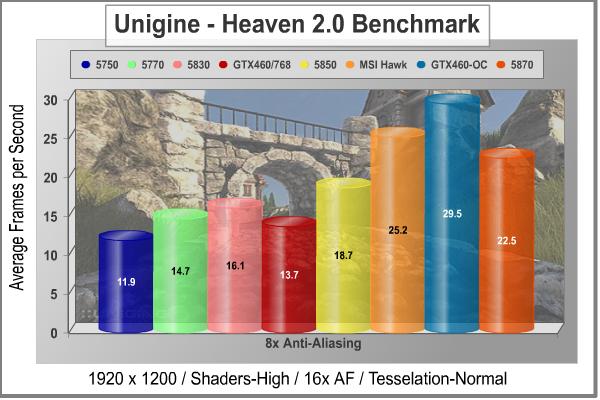
Increasing the anti-aliasing just improved the already convincing performance of the MSI N460GTX HAWK, relative to the Radeon HD 5xxx series. It's interesting to note that the HD 5850 doesn't stand out so much with this benchmark; everywhere else, it seems to jump a little higher than its Radeon neighbors. There's no denying that the Fermi chip, in its best interpretation yet: the GF104, is a killer when called upon for tessellation duty. The only caveat is that the 768MB version did not do as well with 8X MSAA enabled. Remember, the reduction in memory size comes with a corresponding reduction in memory bandwidth, and the number of ROP units that are enabled. That's probably what killed its performance in this particular test, not the actual amount of GDDR5 RAM available.
Let's take a look at one more DX11 benchmark, a decidedly less cheerful scenario in a post-apocalyptic "Zone", which is traversed by mercenary guides called Stalkers.
|
Graphics Card |
Processor |
Core Clock |
Shader Clock |
Memory Clock |
Memory |
Memory |
| XFX Radeon HD5750 (HD-575X-ZNFC) |
720 |
700 |
N/A |
1150 |
1.0GB GDDR5 |
128-bit |
| ATI Radeon HD5770 (Engineering Sample) |
800 |
850 |
N/A |
1200 |
1.0GB GDDR5 |
128-bit |
| XFX Radeon HD5830 (HD-583X-ZNFV) |
1120 |
800 |
N/A |
1000 |
1.0GB GDDR5 |
256-bit |
|
ASUS GeForce GTX 260 (ENGTX260 MATRIX) |
216 |
576 |
1242 |
999 |
896MB GDDR3 |
448-bit |
| NVIDIA GeForce GTX460-768 (Engineering Sample) |
336 |
675 |
1350 |
900 |
768 MB GDDR5 |
192-bit |
|
XFX Radeon HD5850 (21162-00-50R) |
1440 |
725 |
N/A |
1000 |
1.0GB GDDR5 |
256-bit |
|
MSI N460GTX HAWK (V238) |
336 |
780 |
1560 |
900 |
1.0GB GDDR5 |
256-bit |
|
ASUS GeForce GTX 285 (MATRIX GTX285) |
240 |
662 |
1476 |
1242 |
1.0GB GDDR3 |
512-bit |
|
XFX Radeon HD5870 (HD-587X-ZNFC) |
1600 |
850 |
N/A |
1200 |
1.0GB GDDR5 |
256-bit |
|
ASUS Radeon HD5870-OC (EAH5870/2DIS/1GD5/V2) |
1600 |
1000 |
N/A |
1250 |
1.0GB GDDR5 |
256-bit |
S.T.A.L.K.E.R.: Call of Pripyat Test Results
The events of S.T.A.L.K.E.R.: Call of Pripyat unfolds shortly after the end of S.T.A.L.K.E.R.: Shadow of Chernobyl. Having discovered about the open path to the Zone center, the government decides to hold a large-scale military "Fairway" operation aimed to take the CNPP under control. According to the operation's plan, the first military group is to conduct an air scouting of the territory to map out the detailed layouts of anomalous fields location. Thereafter, making use of the maps, the main military forces are to be dispatched. Despite thorough preparations, the operation fails. Most of the avant-garde helicopters crash. In order to collect information on reasons behind the operation failure, Ukraine's Security Service sends their agent into the Zone center.
S.T.A.L.K.E.R.: CoP is developed on X-Ray game engine v.1.6, and implements several ambient occlusion (AO) techniques including one that AMD has developed. AMD's AO technique is optimized to run on efficiently on Direct3D11 hardware. It has been chosen by a number of games (e.g. BattleForge, HAWX, and the new Aliens vs. Predator) for the distinct effect in it adds to the final rendered images. This AO technique is called HDAO which stands for ‘High Definition Ambient Occlusion' because it picks up occlusions from fine details in normal maps.

Once we turn on DirectX 11 with S.T.A.L.K.E.R.: CoP, we're left with only the latest GPUs to test with. No more GT200 cards, which had trouble handling the DX10 features in this game anyways. In this case, the GTX460 doesn't jump to the head of the class like it did with Unigine's heaven 2.0, primarily because there isn't as much emphasis on tessellation here. The primary influence on the overall graphics design seems to be the features introduced in DirectX 10 and 10.1, namely SSAO (Screen Space Ambient Occlusion).
"Shadows" is the first thing that comes to my mind when trying to think of words to describe the scenes in this gloomy adventure. While tessellation seems to help emphasize the height dimension, i.e. large scale textures, SSAO plays in the shadows, where the dimensions are relatively flat. They are both required in order to enhance realism, but between Heaven and S.T.A.L.K.E.R.: CoP, each of these two games/benchmarks emphasizes one over the other. Fermi may be "DX11 Done Right", but I think there is still some work for NVIDIA to do on optimizing their H/W and S/W for DX10 code.
Our next benchmark of the series is not for the faint of heart. Lions and Tigers - OK, fine. Guys with guns - I can deal with that. But those nasty little spiders......NOOOOOO! How did I get stuck in the middle of a deadly fight between Aliens vs. Predator anyway? Check out the results from our newest DirectX11 benchmark in the next section.
|
Graphics Card |
Processor |
Core Clock |
Shader Clock |
Memory Clock |
Memory |
Memory |
| XFX Radeon HD5750 (HD-575X-ZNFC) |
720 |
700 |
N/A |
1150 |
1.0GB GDDR5 |
128-bit |
| ATI Radeon HD5770 (Engineering Sample) |
800 |
850 |
N/A |
1200 |
1.0GB GDDR5 |
128-bit |
| XFX Radeon HD5830 (HD-583X-ZNFV) |
1120 |
800 |
N/A |
1000 |
1.0GB GDDR5 |
256-bit |
|
ASUS GeForce GTX 260 (ENGTX260 MATRIX) |
216 |
576 |
1242 |
999 |
896MB GDDR3 |
448-bit |
| NVIDIA GeForce GTX460-768 (Engineering Sample) |
336 |
675 |
1350 |
900 |
768 MB GDDR5 |
192-bit |
|
XFX Radeon HD5850 (21162-00-50R) |
1440 |
725 |
N/A |
1000 |
1.0GB GDDR5 |
256-bit |
|
MSI N460GTX HAWK (V238) |
336 |
780 |
1560 |
900 |
1.0GB GDDR5 |
256-bit |
|
ASUS GeForce GTX 285 (MATRIX GTX285) |
240 |
662 |
1476 |
1242 |
1.0GB GDDR3 |
512-bit |
|
XFX Radeon HD5870 (HD-587X-ZNFC) |
1600 |
850 |
N/A |
1200 |
1.0GB GDDR5 |
256-bit |
|
ASUS Radeon HD5870-OC (EAH5870/2DIS/1GD5/V2) |
1600 |
1000 |
N/A |
1250 |
1.0GB GDDR5 |
256-bit |
Aliens Vs. Predator Test Results
Rebellion, SEGA and Twentieth Century FOX have released the Aliens vs. Predator DirectX 11 Benchmark to the public. As with many of the already released DirectX 11 benchmarks, the Aliens vs. Predator DirectX 11 benchmark leverages your DirectX 11 hardware to provide an immersive game play experience through the use of DirectX 11 Tessellation and DirectX 11 Advanced Shadow features.

In Aliens vs. Predator, DirectX 11 Geometry Tessellation is applied in an effective manner to enhance and more accurately depict HR Giger's famous Alien design. Through the use of a variety of adaptive schemes, applying tessellation when and where it is necessary, the perfect blend of performance and visual fidelity is achieved with at most a 4% change in performance.
DirectX 11 hardware also allows for higher quality, smoother and more natural looking shadows as well. DirectX 11 Advanced Shadows allow for the rendering of high-quality shadows, with smoother, artifact-free penumbra regions, which otherwise could not be realized, again providing for a higher quality, more immersive gaming experience.
Benchmark Reviews is committed to pushing the PC graphics envelope, and whenever possible we configure benchmark software to its maximum settings for our tests. In the case of Aliens vs. Predator, all cards were tested with the following settings: Texture Quality-Very High, Shadow Quality-High, HW Tessellation & Advanced Shadow Sampling-ON, Multi Sample Anti-Aliasing-4x, Anisotropic Filtering-16x, Screen Space Ambient Occlusion (SSAO)-ON. You will see that this is a challenging benchmark, with all the settings turned up and a screen resolution of 1920 x 1200, as only the HD5870 cards achieved an average frame rate of 30FPS.

This is truly a DirectX11 only benchmark, so we're limited to looking at only the latest generation cards that I had available. This is clearly a tough benchmark, and it's very useful for testing the latest and greatest graphics hardware. The stock ATI HD 5870, with a core clock of 850 MHz, just barely reached 30 FPS as an average frame rate. Using anything less than the top hardware, some scenes had a jumpy quality to them. The overclocked MSI N460GTX HAWK got the closest, in terms of smooth video quality, with an average frame rate of 24 FPS at factory clocks, and almost 29 FPS at its maximum speed. In this instance, the lower spec'd GTX460 just edged out the HD 5830, no doubt due to its tessellation muscle.
I chose Aliens vs. Predator to do most of my major overclock trials with. It drives the cards really hard, and will crash at the first sign of misbehavior. It also recovers nicely, which is handy for repeated testing where you are constantly probing the limits. At the maximum clock rate that I could keep stable, which was 952 MHz on the core and 1904 on the shaders, the AvP benchmark was running reliably at 28.8 FPS. Temps were moderate, at 55C with 100% fan settings, even after a dozen consecutive runs.
In our next section, we investigate the thermal performance of the EVGA GTX460 SC, and see how well the reference cooler works on the latest Fermi offering.
|
Graphics Card |
Processor |
Core Clock |
Shader Clock |
Memory Clock |
Memory |
Memory |
| XFX Radeon HD5750 (HD-575X-ZNFC) |
720 |
700 |
N/A |
1150 |
1.0GB GDDR5 |
128-bit |
| ATI Radeon HD5770 (Engineering Sample) |
800 |
850 |
N/A |
1200 |
1.0GB GDDR5 |
128-bit |
| XFX Radeon HD5830 (HD-583X-ZNFV) |
1120 |
800 |
N/A |
1000 |
1.0GB GDDR5 |
256-bit |
|
ASUS GeForce GTX 260 (ENGTX260 MATRIX) |
216 |
576 |
1242 |
999 |
896MB GDDR3 |
448-bit |
| NVIDIA GeForce GTX460-768 (Engineering Sample) |
336 |
675 |
1350 |
900 |
768 MB GDDR5 |
192-bit |
|
XFX Radeon HD5850 (21162-00-50R) |
1440 |
725 |
N/A |
1000 |
1.0GB GDDR5 |
256-bit |
|
MSI N460GTX HAWK (V238) |
336 |
780 |
1560 |
900 |
1.0GB GDDR5 |
256-bit |
|
ASUS GeForce GTX 285 (MATRIX GTX285) |
240 |
662 |
1476 |
1242 |
1.0GB GDDR3 |
512-bit |
|
XFX Radeon HD5870 (HD-587X-ZNFC) |
1600 |
850 |
N/A |
1200 |
1.0GB GDDR5 |
256-bit |
|
ASUS Radeon HD5870-OC (EAH5870/2DIS/1GD5/V2) |
1600 |
1000 |
N/A |
1250 |
1.0GB GDDR5 |
256-bit |
MSI N460GTX HAWK Temperatures
It's hard to know exactly when the first video card got overclocked, and by whom. What we do know is that it's hard to imagine a computer enthusiast or gamer today that doesn't overclock their hardware. Of course, not every video card has the head room. Some products run so hot that they can't suffer any higher temperatures than they generate straight from the factory. This is why we measure the operating temperature of the video card products we test.
To begin testing, I use GPU-Z to measure the temperature at idle as reported by the GPU. Next I use FurMark 1.8.2 to generate maximum thermal load and record GPU temperatures at high-power 3D mode. The ambient room temperature remained stable at 26C throughout testing. I know this is a bit higher than the average American household, but we had a massive heat wave this summer and my testing is done in an upstairs room that doesn't get as much of the central A/C as I would like... Besides, I know some of you are not living in iceboxes and would be interested in how well the GTX 460 handles high ambient temps. I do have a ton of airflow into the video card section of my benchmarking case, with a 200mm side fan blowing directly inward, so that helps alleviate the high ambient temps.
The MSI N460GTX HAWK video card recorded 28C in idle 2D mode, and increased to 53C after 30 minutes of stability testing in full 3D mode, at 1920x1200 resolution, and the maximum MSAA setting of 8X. With the fan set on Automatic, the speed rose to 64% under full load. Before we talk about the temps under load, it's worth paying attention to the idle temperatures. I rarely see idle temps this low above ambient, but if you follow along into the next section on power consumption, I think you'll see the explanation.
|
Load |
Fan Speed |
GPU Temperature |
|
Idle |
40% - AUTO (1620 RPM) |
28C |
|
Furmark |
64% - AUTO (3720 RPM) |
53C |
|
Furmark |
100% - Manual (4650 RPM) |
50C |
53C is a tremendous result for temperature stress testing, especially with such a powerful GPU, stock fan settings, a moderately high ambient of 26C, and fan speeds controlled by the card. I'm used to seeing video card manufacturers keeping the fan speeds low and letting GPU temps get into higher temperature regions. In this case, the fan controller ramped up nicely to the 64% mark when running on auto. With high quality PWM-controlled fans that run fairly quiet, I didn't notice a major shift in fan noise, either. There is definitely some benefit to running the fan harder, as you can see from the 100% fan results above.

I rarely do my benchmarking tests with fans set on Automatic, preferring to give the GPU or CPU the best shot at surviving the day intact. With an integrated temperature controller in play though, I want to show how the manufacturer has programmed the system. This is one video card where I am completely happy with the stock fan profile. When I was maxing out both the voltage on all the subsystems and cranking the clocks up, I stuck to 100% on the fan, almost all the time. I did one test with 950 MHz on the core and the fan on Auto though, just to see: the fan controller ramped up to 65% and the GPU got to 55C. Turning the fan back up to 100% brought it down a few degrees, to 51C.
Load temps never got higher than 55C when running continuous gaming benchmarks with automatic fan speeds, so the cooling system definitely does the job, and there is a lot of temperature headroom left for the GPU. The noise at 100% speed was much lower than some other products I've tested recently that had squirrel cage blowers. For me, this type of fan noise is less irritating than what a radial fan produces, but I still prefer a design that pushes all the heated air out the back of the case. For normal usage patterns including gaming, I'd leave the fan settings on Auto. For benchmarking, it's worth putting up with a tiny little bit more noise, and to drive the fan at 100%.
FurMark is an OpenGL benchmark that heavily stresses and overheats the graphics card with fur rendering. The benchmark offers several options allowing the user to tweak the rendering: fullscreen / windowed mode, MSAA selection, window size, duration. The benchmark also includes a GPU Burner mode (stability test). FurMark requires an OpenGL 2.0 compliant graphics card with lot of GPU power!

FurMark does do two things extremely well: drive the thermal output of any graphics processor higher than any other application or video game, and it does so with consistency every time. While FurMark is not a true benchmark tool for comparing different video cards, it still works well to compare one product against itself using different drivers or clock speeds, or testing the stability of a GPU, as it raises the temperatures higher than any program. But in the end, it's a rather limited tool.
In our next section, we discuss electrical power consumption and learn how well (or poorly) each video card will impact your utility bill...
VGA Power Consumption
Life is not as affordable as it used to be, and items such as gasoline, natural gas, and electricity all top the list of resources which have exploded in price over the past few years. Add to this the limit of non-renewable resources compared to current demands, and you can see that the prices are only going to get worse. Planet Earth is needs our help, and needs it badly. With forests becoming barren of vegetation and snow capped poles quickly turning brown, the technology industry has a new attitude towards turning "green". I'll spare you the powerful marketing hype that gets sent from various manufacturers every day, and get right to the point: your computer hasn't been doing much to help save energy... at least up until now. Take a look at the idle clock rates NVIDIA programmed into the BIOS for this GPU. Yes, that's two digits for core and memory clocks, right out of the box; no special power-saving software utilities required.

To measure isolated video card power consumption, I used the Kill-A-Watt EZ (model P4460) power meter made by P3 International. A baseline test is taken without a video card installed inside our computer system, which is allowed to boot into Windows and rest idle at the login screen before power consumption is recorded. Once the baseline reading has been taken, the graphics card is installed and the system is again booted into Windows and left idle at the login screen. Our final loaded power consumption reading is taken with the video card running a stress test using FurMark. Below is a chart with the isolated video card power consumption (not system total) displayed in Watts for each specified test product:
VGA Product Description(sorted by combined total power) |
Idle Power |
Loaded Power |
|---|---|---|
NVIDIA GeForce GTX 480 SLI Set |
82 W |
655 W |
NVIDIA GeForce GTX 590 Reference Design |
53 W |
396 W |
ATI Radeon HD 4870 X2 Reference Design |
100 W |
320 W |
AMD Radeon HD 6990 Reference Design |
46 W |
350 W |
NVIDIA GeForce GTX 295 Reference Design |
74 W |
302 W |
ASUS GeForce GTX 480 Reference Design |
39 W |
315 W |
ATI Radeon HD 5970 Reference Design |
48 W |
299 W |
NVIDIA GeForce GTX 690 Reference Design |
25 W |
321 W |
ATI Radeon HD 4850 CrossFireX Set |
123 W |
210 W |
ATI Radeon HD 4890 Reference Design |
65 W |
268 W |
AMD Radeon HD 7970 Reference Design |
21 W |
311 W |
NVIDIA GeForce GTX 470 Reference Design |
42 W |
278 W |
NVIDIA GeForce GTX 580 Reference Design |
31 W |
246 W |
NVIDIA GeForce GTX 570 Reference Design |
31 W |
241 W |
ATI Radeon HD 5870 Reference Design |
25 W |
240 W |
ATI Radeon HD 6970 Reference Design |
24 W |
233 W |
NVIDIA GeForce GTX 465 Reference Design |
36 W |
219 W |
NVIDIA GeForce GTX 680 Reference Design |
14 W |
243 W |
Sapphire Radeon HD 4850 X2 11139-00-40R |
73 W |
180 W |
NVIDIA GeForce 9800 GX2 Reference Design |
85 W |
186 W |
NVIDIA GeForce GTX 780 Reference Design |
10 W |
275 W |
NVIDIA GeForce GTX 770 Reference Design |
9 W |
256 W |
NVIDIA GeForce GTX 280 Reference Design |
35 W |
225 W |
NVIDIA GeForce GTX 260 (216) Reference Design |
42 W |
203 W |
ATI Radeon HD 4870 Reference Design |
58 W |
166 W |
NVIDIA GeForce GTX 560 Ti Reference Design |
17 W |
199 W |
NVIDIA GeForce GTX 460 Reference Design |
18 W |
167 W |
AMD Radeon HD 6870 Reference Design |
20 W |
162 W |
NVIDIA GeForce GTX 670 Reference Design |
14 W |
167 W |
ATI Radeon HD 5850 Reference Design |
24 W |
157 W |
NVIDIA GeForce GTX 650 Ti BOOST Reference Design |
8 W |
164 W |
AMD Radeon HD 6850 Reference Design |
20 W |
139 W |
NVIDIA GeForce 8800 GT Reference Design |
31 W |
133 W |
ATI Radeon HD 4770 RV740 GDDR5 Reference Design |
37 W |
120 W |
ATI Radeon HD 5770 Reference Design |
16 W |
122 W |
NVIDIA GeForce GTS 450 Reference Design |
22 W |
115 W |
NVIDIA GeForce GTX 650 Ti Reference Design |
12 W |
112 W |
ATI Radeon HD 4670 Reference Design |
9 W |
70 W |
The MSI N460GTX HAWK pulled just 16 (138-122) watts at idle and 184 (306-122) watts when running full out, using the test method outlined above. With the core voltage maxed out, these numbers rose to 22 watts at idle and 215 watts at full load and 950 MHz. So, there's good news for those who were frightened off by the GF100 power consumption. The GF104 is much more frugal, especially in idle, where the device driver runs the clocks WAY down, without any apparent ill effects. Built on 40nm technology, those two billion transistors could be pulling a lot more power and generating a lot more heat with older chip technology, exactly like the GT200 cards built with 55nm chips did. Next, I'll offer you some final thoughts, and my conclusions. On to the next page...
NVIDIA GTX460 Final Thoughts
I wrote earlier this year that the first Fermi cards from NVIDIA were not really "Competitors" for ATI, because they occupied different price and market segments than the existing series of Radeon HD 5xxx video cards. Well all that's changed now, with the introduction of the GF104 GPU. With 1.95 billion transistors and an estimated die size of 366 mm2, it's in the same league as the ATI Cypress chip, introduced last September on the Radeon HD 5870. On second thought, maybe NVIDIA is in the National League and ATI is in the American League. They both play the same game, but by different rules, and once a year everyone gets together and pretends that they are all the same. Then it's Football season, thank goodness.
If I allow myself to anthropomorphize these products, I thought it was a bit cruel for the GF104 to go gunning for the HD 5830, the crippled sister of the Radeon family. As fate would have it, she held on to the $200-$240 market with only a hope and a prayer by her side. There was no better point for NVIDIA to attack, with a product more clearly focused on gaming graphics, than this thinly populated market segment. Resistance was futile; there was no way the GTX 460 was going to lose this battle. That's because the GTX 460 is a wolf in sheep's clothing. To put it more plainly, and give away my conclusion to those who are reading this entire page, the GTX 460 is a 5850-class video card with a $230 price tag.
From a technology standpoint, the GTX 460 has a whole lot more in common with the Radeon HD 5850 than it does with the HD 5830. Let's compare. The HD 5850 disables one out of ten (10%) possible stream processing units, the HD 5830 disables three out of every ten (30%). The GTX 460 ships with one out of eight possible Streaming Multiprocessor blocks (12.5%) disabled. Match ‘em up.... looks like a 5850 to me. Now let's look at clock rates, the top clock rate that ATI specs out for the Cypress line is 850 MHz, and the HD 5850 ships with a 725 MHz stock clock. It's too early to guess what the highest clock will be on the GF104 chip, but Galaxy and Palit are already shipping cards with factory core clocks over 800 MHz. Almost every reviewer that bothered to overclock their GTX 460 sample got it easily up to the 850 range. The base clock for the GTX 460 is 675 MHz. Once again, the similarity to the HD 5850 is pretty plain; chop off one (presumably dead) processing cluster and downclock the core significantly, so it doesn't compete with the top model (or the lame duck GTX 465 in this case...).
Forgive me for dabbling in a bit of fairy tale economics, but I can't help myself. First of all, I'm going to make a bold assumption that an HD 5830 chip costs exactly the same amount of money to produce as an HD 5870 or HD 5850. Same amount of silicon, same pin out, same package, same testing costs - all the production costs are equal. Next, I'll extend the same bold assumption and conclude that every GF104 chip costs almost exactly the same as the Cypress chips I just mentioned. Same number of transistors, same technology node, same supplier, same production lines, same die area, etc. The only difference is the R&D and SG&A costs that have to get amortized in to establish a fully burdened cost. (I wish I could add a survey button here: agree or disagree.) The pricing model on the other hand, has you paying for performance, which seems realistic and fair for the consumer. That's where NVIDIA chose their battleground.

I've come to one inescapable conclusion: the GTX460 is really comparable to an HD 5850 from a technology standpoint, and NVIDIA chose to sell it at a price point currently occupied by a lesser model, the HD 5830. Sounds like a good marketing plan to me, especially since I believe that every Cypress-based card and every GF104-based card share the same cost structure. Sure, you can add or subtract features, but the fundamental production costs are comparable, even if the performance is not. ATI has had a monopoly on DX11 hardware for what seems like ages, so you can't blame NVIDIA for throwing a spanner in the works and trying to disrupt the market. Finally, I can say, "Fermi = Competition". BTW, just like you, I can't wait to read the next chapter in this continuing battle saga.
MSI N460GTX HAWK Conclusion
From a performance standpoint, it's impossible to argue with the numbers this card puts up, at its price point. As I hypothesized in my Final Thoughts, this is really a 5850-class card from a technology standpoint, and it performed like one. Overclocked far beyond its standard operating point, to 950 MHz on the core, it sweeps the field in its market segment and takes a surprise swing at the next level up. The cooling performance is the best available for this chip, at the moment, including the noise required to achieve it, which was quite low. I was very happy with the standard fan settings, as the default curve is aimed at performance users and the cooler has so much headroom available. The combination of a new low-power Fermi GPU and an over-designed cooler kept operating temperatures very low during both intensive gaming and brutal stress testing.
The appearance of the MSI N460 GTX HAWK video card is very attractive, and yet somewhat conservative. MSI did a nice job producing a subtle design that is business-like, yet manages to show off its muscles at the same time. Kind of like early Schwarzenegger in an Italian suit. The anodized aluminum shroud does a good job of avoiding fingerprints without being a dull expanse of grey. They have definitely improved on the earlier version of the Twin Frozr cooler in terms of visual design.

The build quality of the MSI N460GTX HAWK card was quite good. Everything is assembled well, everything fit when I put it back together, and the overall impression of the card was very solid. The cooler adds a certain heft to the card and also lends a good deal of solidity to the package. The packaging was of the highest quality and very informative. The front panel lifts up to showcase a large display of all the many features this card incorporates. I was not as impressed by the manufacturing quality of the PC board, which still had too much residue from the wave solder/cleaning process for my liking. The unique power supply arrangement used all high quality parts, and was clearly intended to be a class leading design. I pushed this card to the wall repeatedly, and it never complained once.
I also have to give top marks to the new MSI Afterburner software. The full scope of voltage adjustment for the GPU core, memory, and PLL components puts this free, bundled software at the top of the heap. There are other tools available which will work just fine on reference hardware, but the new version 2.0.0 is the icing on the cake for this very special hardware.
The basic features of the MSI N460GTX are fully comparable with the latest offerings from both camps. It has: Microsoft DirectX 11 Support, PhysX Technology, is 3D Vision Ready, also 3D Vision Surround Ready, CUDA Technology, SLI, 32x Anti-aliasing, PureVideo HD, and HDMI 1.4a support. We've been using some of these same, or competitive, technologies on a whole host of Radeon 5xxx cards since last September. Still, it's good to finally have rough parity in the features and functions arena. All the other features are directly related to extracting the full raw computing power from the GPU, and are covered elsewhere on this page.
As of late September 2010, the price for the MSI N460GTX HAWK is $189.99 at Amazon or NewEgg. There is currently a $10 MIR available and MSI is giving away free STEAM codes for Metro 2033 with every GTX460 they sell, so consider that in your purchasing decisions. It's hard to find a bad deal for any of the GTX460 cards; even if you are paying a premium for certain features, more memory, or a software bundle, the price-to-performance ratio is so good, there's not a lot of downside anywhere. This particular model offers the best cooling subsystem available for the GTX460 GPU and arguably the best power section as well, and the price adder for all that is between negligible and non-existent. I rate it as a real bargain for that reason.
Let's face it, almost any GTX460 card is going to get high marks at this stage of the game. NVIDIA has priced it very aggressively, and until ATI responds with some serious price cuts, or releases its next generation of video cards, this is the card to beat in the $200-$250 price range. It's pretty obvious from all the reporting that's been done already, that early production units of the GF104 have tons of overclocking headroom. I got 950 MHz on the core clock with very little effort, and the Twin Frozr cooler kept the temperatures well below 60C no matter how hard I stressed the card. If you really want to push your graphics card to the max and beyond, without worrying about cooking the GPU, this is the GTX 460 card to buy.
Pros:
+ Incredibly effective cooling system
+ Improved power supply design
+ Best monitoring and control S/W bundle
+ Excellent overclocking headroom
+ Outstanding price/performance ratio
+ 1000 MHz GDDR5 overclocks better than 1250 MHz parts
+ Very low idle clocks = low power consumption
+ Memory ICs are cooled by airflow from fan
+ Enthusiast-oriented fan profile
+ Pre-wired connectors for voltage monitoring
+ Second round of driver updates available now
Cons:
- Imagine what this card could do with binned GPUs
- Why not go for the 1250 MHz memory that's readily available
- Almost all heat from the card is pushed into the case
- Voltage adjustments don't show actual values in Afterburner
Ratings:
- Performance: 9.50
- Appearance: 9.00
- Construction: 8.75
- Functionality: 9.00
- Value: 9.50
Final Score: 9.15 out of 10.
Excellence Achievement: Benchmark Reviews Golden Tachometer Award.
Questions? Comments? Benchmark Reviews really wants your feedback. We invite you to leave your remarks in our Discussion Forum.
Related Articles:
- ASUS ENGTX285 TOP GeForce GTX 285 Video Card
- Hiper Osiris HTC-1K514 Mid-Tower Computer Case
- Vendetta 2 vs TRUE vs HDT-S1283
- Xigmatek Red Scorpion S1283 HDT CPU Cooler
- Prolimatech Megahalems LGA775/1366 CPU Cooler
- Mad Catz Cyborg RAT-7 Laser Gaming Mouse
- Best CPU Cooler Performance - Q2 2008
- CM Storm Recon Mouse and Skorpion
- Intel Core i5-655K Processor BX80616I5655K
- ZOTAC GeForce 9800 GTX 512MB Video Card

Comments
On the other hand, the 400 platform is Fermi/PhyX/Cuda and DX11 of course--being that the 285 isn't all that! It seems like what we're getting is a great DX11 Fermi/Cuda PhysX card that runs DX11 games, but doesn't give us more speed than the old cards of yesteryear, and even less in DX10 games.
Comparing old to new is frustrating at best, because they are so different. But maybe you should also consider the price point,........
My 2GB EVGA GTX-285 card was well over $500.00 when it was new, and these GTX-460's are well under half of that price. So I'm about to order two of these for SLI performance that will destroy my GTX-285's capabilities and also get all of the latest technology in rendering eye candy as well. (for less money)
I think that these cards, (especially two of them together) will amount to a definite 'Win-Win' in the consumer marketplace.
On the other hand if your card is older than the 200 series you've got a reason and price point that says upgrade now. The 460's will have you kicking butt and taking names at a much lower price point that those who recently bought the 260's or 285's
The issue really comes to the forefront because GTX460 cards are almost universally wicked overclockers. Just about every single card sold since day one will take a 25% overclock in stride, with very little additional voltage, or none at all if you're lucky.
For me, I love the DX11 eyecandy, and it's only going to get better with newer titles, IMHO.
Nice Review!
Until someone comes out with a water cooled model, every hardcore overclocker is going to want this card.