

| Rosewill RK-9000BR Mechanical Keyboard |
| Reviews - Featured Reviews: Input Devices | |||||||||||||||||||||||
| Written by Austin Downing | |||||||||||||||||||||||
| Sunday, 03 June 2012 | |||||||||||||||||||||||
Rosewill RK-9000BR Mechanical Keyboard
Manufacturer: Rosewill Full Disclosure: The product sample used in this article has been provided by Rosewill. Having used and reviewed quite a few mechanical keyboards in the last year I have now tried out almost every type of Cherry MX switch out there except the Cherry MX Brown and Clear switches. Thankfully, in this during this review of the Rosewill RK-9000BR I was able to knock yet another switch off my list. The Cherry MX Brown switches used on the Rosewill RK-9000BR provide would be customers with the best of both Cherry MX Black, and Blue switches without the negatives of each. Benchmark Reviews will be evaluating the Rosewill RK-9000BR to see how these switches hold up to daily use and what they are like to use for an extended amount of time when compared to their red, black, and blue counterparts. Rosewill designed the RK-9000BR for consumers who would like a basic keyboard that provides them with the ability to comfortably type without extra software, flashy exteriors, and extra keys. With exactly those people in mind the RK-9000BR provides a superior typing experience using the Cherry MX Brown switches without any of the extra frills that other keyboards on the market might be burdened with.
As with any other peripheral it is important look at the Corsair Vengeance K90 from a well-rounded standpoint, this means using it in a various situations including gaming (MMO, RTS, FPS), and from a typist standpoint. Rosewill RK-9000BR Mechanical Keyboard Features
Rosewill RK-9000BR Mechanical Keyboard Specifications
Closer Look: Rosewill RK-9000BR KeyboardThe Rosewill RK-9000BR could be used in a multitude of situations. From a typical work space in a business, to a home gaming lounge, to a small home office the simple design of the RK-9000BR will allow it to fit in almost situation.
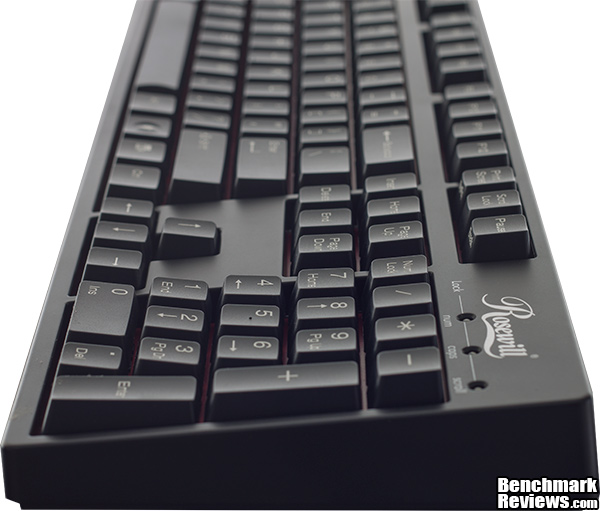
The Rosewill RK-9000BR is a standard size keyboard with full size keys and a simple black exterior and laser printed keys. The entire face of the keyboard has a nice curve to it providing a very comfortable typing experience with each key in perfect reach. The Rosewill RK-9000BR has no media functions or customizable keys and as such may not be suitable for many groups of users but for users in offices or who want a no frills keyboard this may be perfect.
The only defining features on the bottom of RK-9000BR are the stands that raises the rear of the keyboard by about 1/2" and flat the rubber feet will keep the RK-9000BR from sliding around when combined with its 3.53Lbs weight.
Using a standard micro USB connector the Rosewill RK-9000BR can easily be disconnected from a system for transport. From this angle, you can also see the red accents that were added to the base of the RK-9000BR. Without being gaudy or overly showy, this definitely gives the RK-9000 a unique look.
Rosewill sells the RK-9000BR with a USB connector and PS/2 connector. In order to have NKRO functionality the RK-9000BR needs to use the PS/2 connector as USB is limited to 6KRO plus two modifier keys. For most purposes, this will be plenty but some users demand NKRO functionality in their keyboards and the RK-9000BR can deliver this.
The Cherry MX Brown switches used on the RK-9000BR are considered a "in-between" switch. They provide the tactile feedback of a switch designed for typing like the Blue switches with the lighter operation of a gaming switch like the Red switches. They have force profile similar to Blue switches with a tactile bump right before activation to allow for faster and more accurate typing. A added benfit of the mechnism used for haptic feed is that when compared to the Cherry MX Blue switches the Cherry MX Brown switches are much quieter typing. Testing & ResultsTesting MethodologyTesting peripherals like the Rosewill RK-9000BR are quite simply a matter of using them in the real world for an extended amount of time. Unfortunately, due to the nature of the product they are no standardized test that can be done but rather it is a matter of personal opinion from the time spent using the product. In order to analyze the qualities of the RK-9000BR I focused on looking at the many different realms of work and play that the RK-9000BR is expected to be subjected to. This means looking at both its qualities as a gaming keyboard, but more importantly its qualities as a method of input for work and school related projects. Test System
Software Tested
ResultsWhen it comes to fast paced gaming, I have been playing Tribes Ascend a bit recently. The high speed pace of Tribes caters to player's quick reflexes and equipment that can keep up. Thankfully, with its NKRO capabilities and the lighter touch needed for actuation the Cherry MX Brown switches the RK-9000BR does a fantastic job keeping up with the needs presented moment by moment in game. A majority of my free time has been spent play the relatively new Star Wars MMO The Old Republic. Now that I am done with school, it has let me delve back into the world of this game and as such, it gave me nice point of references to compare the RK-9000BR to the other keyboards I have used in the past. I found the RK-9000BR to be very comfortable even during extremely long gaming session during which I needed to be able to quickly use multiple key combinations to vanquish tge enemies that lay before me. The physical bump that is provided by the haptic feedback allowed me too quickly cycle through actions without needing to make sure that the button I pressed had actually activated. My final and most important test was to determine what the RK-9000BR was like to type on. I found that with haptic feedback but otherwise quiet design the RK-9000BR was an absolute joy to type on. I found I typed as fast as the Cherry MX Blue designs but did not have to deal with the substantial noise that they created. The Cherry MX Browns are still quiet even when you bottomed them a problem that the Corsair Vengeance K90 had especially if you are a particually hard type. Rosewill RK-9000BR Final ThoughtsThe RK-9000BR is an interesting beast. With its Cherry MX Brown switches the RK-9000BR is fantastic to type on because of the haptic feedback that the Brown switches provide without all of the noise that typically is associated with the Blue switches. At the same time, the simple nature of the RK-9000BR will allow it to feel at home on almost any desk. For gamers it provides a better experience than a Cherry MX Blue switch based keyboard because of the ability to bounce between the reset and actuation point allowing for quickly double taps. Sadly, I do have some gripes about the RK-9000BR. Every keyboard I have reviewed up until the RK-9000BR had some form of media control whether it is a dedicated function or some form of key combination. It would have also been nice to have software capable of customize the RK-9000BR along with some extra function keys so that enthusiast could customize the RK-9000BR to fit their needs. If it were not for the high price of the RK-9000BR these lacking features may have been a forgivable but at $109 I really would like to see some built in media control, function keys, and software for customizability in future revisions of the RK-9000BR.
Rosewill RK-9000BR ConclusionPerformance is about allowing the user to perform at their best without being held back by their peripheral. Thankfully, in that department the RK-9000BR goes far and above the call of duty. The Cherry MX Brown switches have a nice amount of haptic feedback that makes them extremely comfortable to type on. Even during a long gaming session, the RK-9000BR is extremely comfortable and really allows a player to be at their best for long periods without fatigue. Appearance wise RK-9000BR is nothing to write home about. Rosewill took very few risks with the design of the RK-9000BR and as such it is neither bad looking nor terribly interesting. It will easily fit in on a gamers desk or in a business for the heavy computer users. Still after reviewing the Corsair K90 the RK-9000BR feels so bland, and I would love to see Rosewill take some risks in the design of their future keyboards. As with many other mechanical keyboards on the market the RK-9000BR is extremely well built with keys designed for 50 million key presses and a build quality well above the average keyboard that comes with many of the major manufactures machines on the market. Even better, Rosewill stands behind the RK-9000BR and its parts with a 3 years parts warranty should something go awry. Functionality of the RK-9000BR is average. It lacks any type of advanced features such as software to customize how it behaves, no extra buttons that can be programmed, it even lacks any form of media control, something I considered to be a standard feature of every keyboard since the early 2000's. For $109.99 (Newegg) value is really were the RK-9000BR falls on its face. Had Rosewill dropped the price to the $70 range then its lack of visual distinction, media controls, and advanced configurations could have easily been forgiven. Instead, the RK-9000BR was priced for $20-40 more than other mechanical keyboard that include many of these extra features that have become standard in recent years. Lacking any type of media control or customization when combined with a high prices means that although the Rosewill RK-9000BR is not a bad keyboard it is still surpassed by its competition to the point that I would not recommend it over other mechanical solutions on the market. Should in the future Rosewill adding more functionality and hopefully at the same time drop the RK-9000BR price my opinion could change but in its current form I feel that there are better solutions to the mechanical keyboard equation than the RK-9000BR. Pros:
+Mechanical switches with haptic feeback Cons:
-Lacks built in media functions Ratings:
Final Score: 8.2 out of 10.Benchmark Reviews invites you to leave constructive feedback below, or ask questions in our Discussion Forum.
Related Articles:
|
|||||||||||||||||||||||



Comments
I hate to be an annoying internet commenter, but I come from a place of love. I want to see more articles written by you and for you to get the chance to review more hardware from more manufacturers. Please look at what I have to say as advice as opposed to criticism.
I as a reader enjoy well-written articles that thoroughly dissect the piece of hardware at hand. That being said, consider using a spell-checker before you submit your articles and perhaps have someone else proofread it too. Also, running the kayboard through only two games seems like it may be a little on the light side for a thorough hardware review. Perhaps a run-through with UT2004, as well as a more prosaic shooter, like TF2 (It's free!) and some of the slower paced "real" (bah!) shooters like CoD or MW#.
Also, running it through it's RTS paces would definitely be well-received. I would love to know how it handled the crazy-high CPS needed for an RTS like Starcraft (1 or 2)
Heck, try some QWOP out, just for fun.
A very good article, and it told me a fair bit about the product, but I'd like to know more.
Best Wishes
I will definitely look into expanding my game library I use for testing in the future though.
...those who live in glass houses...
Price: Yes, I feel $100 is expensive for what you get, but the reality is that Newegg almost constantly has one of their mechanical keyboard variations on sale for ~$80 (or even cheaper very occasionally). I purchased mine for $80 and feel it was well worth the money.
Quality: The Cherry switches are really the star of the show. You don't buy this keyboard if you aren't annoyed by typing on rubber domes. That said, didn't know how annoying rubber domes were until I bought this keyboard though (after much research, deliberation, and introspection about my personal preferences). Media keys don't matter to me. I have a speaker set that has its own handy volume control module that is far more portable than a hefty keyboard. Speaking of heft, this keyboard feels extremely solid. It is good for the stuff that keyboards are required to do.
Cons: The reviewer (Mr. Downing) is correct when he points out this keyboard is no frills. It is not a "gaming" keyboard regardless of what switch you choose. It's purpose is only to provide a great keyboard interface - if that improves your gaming, then it is a side effect of that focus on the larger picture. That said, my biggest complaint is the quality of the keycaps. This where (unlike the understatedly appealing red backplate) Rosewill has clearly cut costs. After no more than a week of usage, the white lettering on the heavily used keys has dimmed to the dull grey of accumulated grime. After using this keyboard for months, virtually all the white is somewhat grimy. This is disappointing to me, even for $80, but it really only annoys me when I am looking at it. When I'm actually using the keyboard, it is not something I notice.
I hope this additional perspective helps anyone considering one of these various Rosewill mechanicals.