

| Raidmax Blade Mid-Tower Computer Case |
| Reviews - Featured Reviews: Cases | |
| Written by Doug Dallam | |
| Monday, 03 October 2011 | |
Raidmax Blade Computer Case Review
Manufacturer: Raidmax Full Disclosure: The product sample used in this article has been provided by Raidmax. It looks like all the case manufacturers on planet Earth are wanting to get into show business lately here at Benchmark Reviews. Well my good friends, today Raidmax sent to me a mid-tower case by the name of "Blade." There are names and there are names, whereas here at Benchmark Reviews, the name of the game is functionality. Well, we apprecaite a unique exterior as well as the next aficionado, but as you all know, a pretty-looking yet nonfunctional case is nearly worthless. Speaking of flash-bang, well, we have some racing stripes, a blue plastic side window, a good-looking robot face, but with a traditional no-frills interior layout: nothing unique in the internal engineering area. Raidmax has opted for a sturdy case with an attractive exterior, while opting for a more traditional interior. So, what's a traditional interior? You're going to have to read, my friend, yes, as much as that pains you. (One other thing before we get started. Please keep in mind that this is a $50.00 case, and not a $60.00, $80.00, or even a $90.00 case, which puts it into the reach of many more people than that of more expensive cases. That's a good thing, especially in today's economic environment, even if other luxuries must be left out, due to cost.)
Don't get my wrong here. It's not a bad looking case, and it will function just fine, although the exterior may be more attractive to the younger crowd among us rather than the more mature. Perhaps all 50.00 dollar cases are similar internally to the Blade, and if so, then I appologize for my lack of enthusiasm, but even though my enthusism isn't sky high, the case functions properly, is sturdy, and inexpensive! But in the spirit of a non-biased review, I'll offer up all the goodies and we'll see what you all think. For me, the Raidmax Blade lacks in areas that are important to me, but perhaps not to you. Let's see what the Blade gives us for 50 bucks. By the way, you can find this case for 40.0 USD after rebates, if you look around. Raidmax Blade Features
Colorful choices: Black, Red, Yellow, White Raidmax Blade Specifications
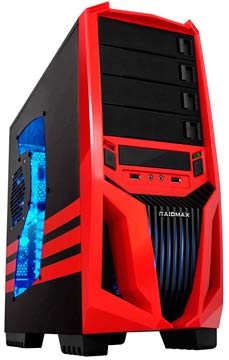
EXTERNAL DRIVE BAYS: 4 X 5.25", 1 X 3.5 Closer Look: ExteriorFrom the outside, the Blade looks nice. Actually, before I got it and checked the price, judging just by its looks, I thought it was going to be a higher end case. As you know, though, you can't tell a book by its cover. So come along and lets thrash us a Raidmax Blade case. Starting us off below, we have a yellow specimen. I like this color combo. It reminds me of Bee in Transformers. Since there isn't really anything else to show detail-wise externally, except the front panel and the plastic feet, I'll go over those aspects here and we'll skip the detailed external section altogether. I mean, the case has no fins, rocket boosters, top blow holes, or anything else of interest on its external. So here you go: You get two USB 2 ports and your two audio ports on the front, with a power and hardrive activity light rounding out the details. The bay covers are unique in that you push the latch left to release them. However, the spring is made from plastic. Too many dismouts could spell a nonfunctional bay cover, but that's probalby not going to happen, that is, unless you like playing musical bay covers all day. Thus, I'd call the slide-over bay dismounts a high point for the case's design. They're uniquely functional and asthetically pleasing. You also get a 3.5" bay for card readers or something similar.
I'd like to tell you how the screen printed strips are quality wise, but you see, Raidmax sent me the all black model, which is, uh, all black, so I don't know how well the stripes are printed. Everything else about the cases are identical, though, save for the colors. Here we have the cable side and the firetruck color option below.
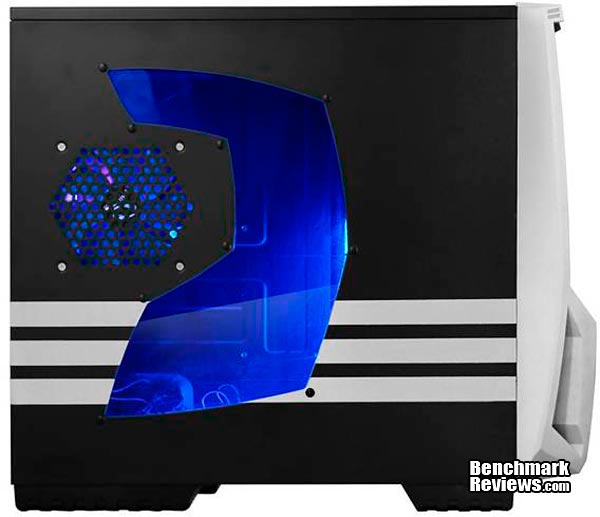
Yes, it has a window. No, it doesn't come with a side fan. Here we have the "nice and white and that's all right" model.
The backside of the Blade and its ventilated expansion slot covers. Yes, they are nice aren't they? Too bad no one ever looks at the back of your case. Yes, I know, "They're for cooling you fool!" If you think that's going to make a difference in how cool this case runs, then you show me your sources, tests, experiments, or zip it troll boy, okay? Not only that, but if they were only for cooling, why did Raidmax pay good money to have them color keyed blue? Anyway, this is your basic back end. Water cooling holes, rear 120mm fan, bottom mount power supply, and that's it. I have no problem or excitation here, so let's roll.
Since there really isn't any reason to do a detailed exterior section, as I mentioned beforehand, I'll split the only two reasons there might have been a detailed exterior section between here and the next section. Here's number one: We have a foot. It's plastic, not rubber. It's hollow plastic too. I mention this because one reviewer on Newegg expressed that one of the feet had broken right away. So be warned! When you initially drop test this case, be careful you don't bust one of the plastic feet. Or, just try not to drop test it. For me, that's a little like wearing a brand new shirt and trying not to get food on it. Really, though, they seem pretty sturdy to me.
I'm ready to crack this baby open; how about you? I'm sure you can't wait, so clicky-clicky!
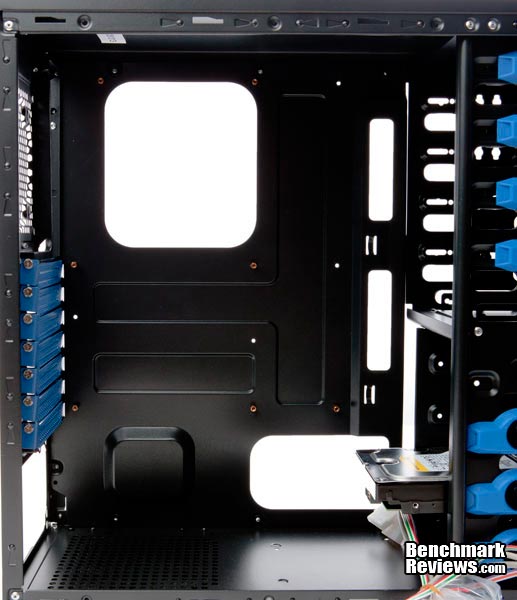
Closer Look: InteriorThe motherboard side. A nice hole for your cooling tower mount option, and you might think some nice cable routing holes, and they are, but there is a little problem with the cable management with this case. We'll get to that, though, in the detailed interior section.
The cable side. Oh yes, there is something of interest here! Note the absence of toolless mounts on this side. I guess Raidmax thought since their tooless mounts were enginered so creatively, the drive would be secure without both sides being locked down. Well, Raidmax, you're wrong to a definitive fault. I'll show you why in just a little bit. Nothing else to exaplin here. Move it!
Here we go. These are popular. A power supply filter, HOORAY!, and the second of only two images that could have gone under the detailed exterior section (that we skipped). Furthermore, even though this is an external filter, it serves the internal aspect of the case, namely the power supply. So I've taken the liberty to stick it here. If this bothers you, please get your flame thrower out and roast me like a tri-tip at a Super Bowl party. I can take it because I'm Old Flat Top: "Here come old Flat Top, He come grooooovin' up slow-lay, He got, Joo-Joo eyeball, He shoot, koooooKa-kola, He got hair, down, to his knee, Got to be a joker cause he do what he please!" ("Come Together," The Beatles).
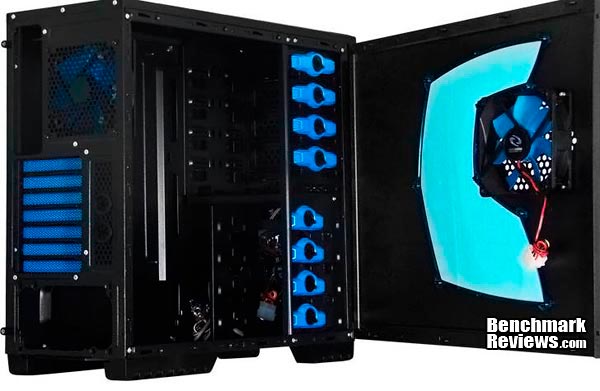
And last, I treat you to a fully opened black option. No, there are no hinges on the front door. It simply slides off like all of the rest. Kinda tricky of them to take the picture like that though, don't you think? It looks cool though right? Yeah. Sure does. Almost makes you think there's a custom swing away door on this model. That's why Benchmark Reviews is your friend. You read reviews like this so you can cut the marketing hustle and see the real deal. Again, the side fan shown here is either invisible when you get the case, or it simply doesn't come with it. Either way, if you want a side fan, you'll need to buy one.
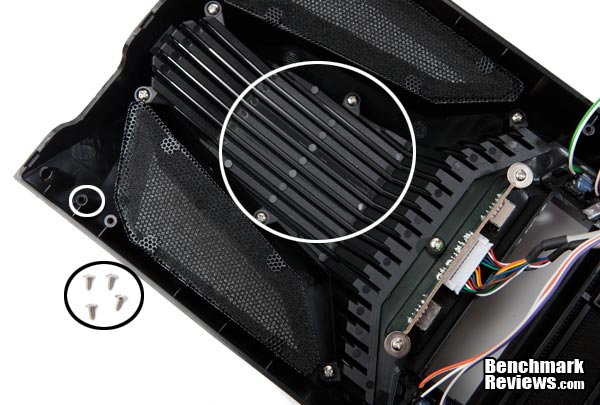
Detailed Interior FeaturesOkay, here we go with one reason I had a spastic-case-hissy-fit. Olin (the Executive Editor here at Benchmark Reviews) has told me that most $50.00 cases use screws to secure the front bezels. What? I just hate that. Do you know what this means? Let me spell it for you: It means everytime you want to clean the front fan filter, or swap the front fan, you need to take off both side panels, get your little screw driver out and unscrew the four little screws, all just to clean the filters or to swap the fan. What's more, the screws are not the type that fit into metal threaded backings. They're self tapping, and they tap right into the plastic of the bezel. Wallow them out after repeated screwing, and you just gave your case the "No Bezel Custom Bust-it Modification."I tried mounting the bezel without the screws, and it did mount with the plastic push pins only, but not really securely. You might get away with it though, and you could definitely get away with just two of the four screws. On the up side, you won't need to clean the front filters because they are mosly nonfunctional. See the filters on the left and right? Well, they don't line up with the front fan. This means most of the air is going directly through the grill, outlined by the white circle, and there is no filter on that grill. Anyway, you can make up your own mind if this bothers you, but keep in mind, it's a $50.00 (or less) case. Something I just noticed too. See the filters? They are cloth over the steel perforated screen. You could just pull them out and clean the mesh from the outside, since the steel mesh will catch a lot of the dust anyway. Many cases now feature only the steel perforated mesh anyway, and that seems to work sufficiently. That being said, most of the air is going into the front grill and not the mesh anyway, which is still a filter problem.
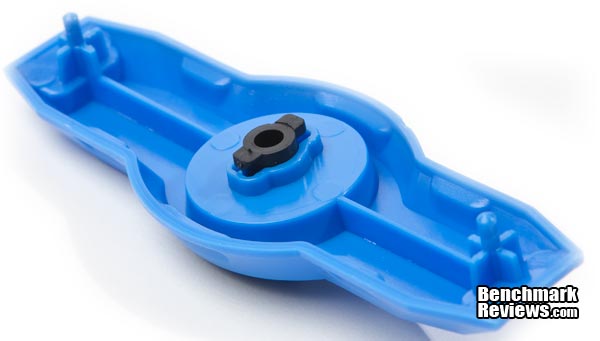
The next aspect of the Blade makes me want to, well, nothing. It just makes me mad that stuff doesn't work as advertised, or if it does, it's just enough to keep the manufacturer out of court for false advertising. Case in point, the Raidmax tooless mount. You turn the knob (on the other side) and the black center part, shown below, presses against the drive holding it securely in place, while the two male pins on either side go into the screw holes of the drive. The ony problem is that the pins and the center part do not hold the drive securely, at all. In fact, the opposite side isn't secured, and is left to flop around or even fall out. I tried doubling them up, one on each side, and that did help, a little, but I was able to pull the drive out, nevertheless, without too much effort. It's not just Raidmax, either, and I'm not bashing Raidmax for doing it. It's called competition--you do certain things or you get eaten! It's "market economies" 101, and this is sadly popular marketing. But we do know that some tooless mounts actually work fairly well (for instance, Cooler Master's). But then again, it's a $50.00 case. You make up your own mind if you think the price warrants the marginal utility of the mount. (I've seen this on $150.00 cases also.)
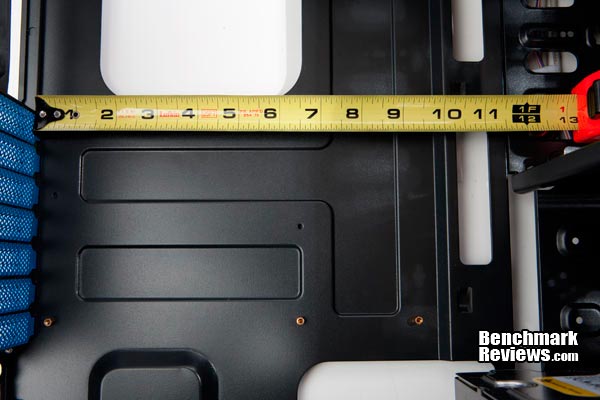
Let's get some measurements. At least this looks pretty good. Almost 11 1/2 inches of space. That should be good enough for the largest cards. Not bad at all. If you need all of your hard drive slots and they're all 3.5", then you'll need to hack off 2" because that's how far the drives protrude into the case (remembering that the drive cage is your traditional back to the motherboard design, and not the better back to the cable panel side design). I assume most people won't have a need to fill every drive bay with 3.5" HDs though, so it's personal choice.
The last thing I want to show you is important for buyers also: cable space, of which there is virtualy none. You get such little space that I couldn't even measure it. I'm guessing that it might be a 1/4" at most, and more like 3/16". So expect to run your power supply cables into the case, and not behind the mother board tray. For sure, you'll be able to get smaller wires around the back, but unless you flex the side panel, you won't get the power supplies' cables back there. Speaking of the motherboard tray, it's acceptably stiff, but with a little flexi-slop on the lower right side (location shown in the last image, bottom right). Yep, you can see here that with the side panel on, you get pretty much no cable routing space. The image below actually looks like there is more space than their really is, too.
Raidmax Blad Mid-tower Case Final ThoughtsLet me say that the front design is pretty cool looking. I like it, and I like the colors. My black review version, however, makes the front facia disappear, so the design is lost. With the new colors, though, you can really see it and that's a high point for the case--it's looks. The bay covers look nice too, and they are unique in that they slide left to release. The paint, the black base coat, seems fine too and the internal steel is rolled with no sharp edges. The internal paint is on par with the external, which is good quality. The Blade is also sturdy and I didn't notice any main struts flexing or bending at all. On the other hand, the nonexistent cable routing space, the screwed on front bezel with the front filters that don't serve much of a filter service, and the hardly functionaing toolless mounts left me a little cold. On the front, you'll find two front USB 2.0 ports and two audio ports, plus a hard drive indicator and power light. If you want an externally cool looking and internally sturdy case on the cheap, this would do it. Just don't expect to use the toolless mounts, unless you don't care about a really loose fit and the danger of your drive falling onto your motherboard when you move the case or the drives ratteling when they spin up, and double that for opticals. It just doesn't add up though. Consider that the case has a viewing side window, but with almost no cable routing space. Who wants to peer in the window only to see a ratball-wire mess? Okay, you can clean it up if you spend some tme, after all, that use to be the way it was for all cases, and we got along just fine, but I trust you get my point.
Raidmax Blade ConclusionThe Raidmax Blade is a good looking case on the outside, but it's internals leave room for improvement. You get a power supply air filter, but, for example, the front fan filters don't line up too well with the fan itself, and draw most (or at least a lot) of the air directly in from the front grill--which has no filter. Perhaps it's normal for sub-fifty dollar cases, so take this with some salt, but the front bezel screws on and the screws tap directly into the plastic front bezel itself. In order to take the bezel off, you'll need to first take off both side panels in order to get to the screws. The construction is solid with rolled internals and no sharp edges. The motherboard tray was a little flexi on the bottom right, but that shouldn't be a problem, and I'm not suggestiong it is in the least. The black paint, externally and internally, seemed very good too, but I could not check the pin stripe quality because Raidmax sent me the all black option. Last, one reviewer on Newegg said that one of his feet broke right away. They are plastic and not rubbrrized, so be careful about that. They don't feel fragile though. Functionality speaking, you will get 11.5" of vid card space as long as you don't have a drive in that location. If you do, it'll cost you 2" because that's how much a 3.5" mechanical drive protrudes into the case (the hard drives mount into the motherboard area). Externally, you'll find two USB 2 ports and the normal audio input and output. The toolless mounts were sloppy at best, and I wouldn't call them functioning mounts at all. There is virtually no cable routing space. I measured less than a 1/4". Finally, the drive cages are not removable. On sale at Newegg, the RAIDMAX Blade is available in several color configurations: $49.95 ATX-298WBP (Black w/500W PSU), $49.99 ATX-298WW (Black/White), $49.99 ATX-298WY (Black/Yellow) This is an average case functionally speaking, and it's main upside is its external looks and inexpensive price. On the up side, it's plenty sturdy too. If you want this case, you're problably going to want it for the external design, which I think quite nice for the price. However, make sure you get a colored model because the all black option hides the front robot like design and looks plain and bulky. No award this time, but given the information here, you can safely buy it knowing what you're getting. Please let me know if you think I'm being too harsh on this little case or not. I look forward to your comments. Pros:
+ Nice external design Cons:
- Bezel requires tools to take off Ratings:
Final Score: 7.75 out of 10.Benchmark Reviews invites you to leave constructive feedback below, or ask questions in our Discussion Forum.
Related Articles:
|
|








Comments
Each to his own I guess.
WHenh I was at University there was a guy who was a friend of mine that was like 6'7" tall, flat-top, smart, really nice guy, wore these coke bottle glasses and his eyes were wasted, like one was all white and the other one pointed skyward. He had some sort of degenerative eye disease, and he walked like, well, "old flat-top." That was his nickname, which he hated. He was the personification of that song.
It's not my type of case, but remember, tastes come in all flavors, and it's only a 50.00USD case. You can probably get it for 40.00USD if you look around. For that price point, it's a sturdy case that you could load and forget. I remember back in 2000 we'd pay more for a case that was flimsy and ugly at the same time.